A missed call at a GP clinic means a rescheduled appointment. A missed call at a vet clinic at 11pm may mean a pet that does not make it to morning. The phone system requirements for Australian veterinary practices are structurally different from those of any other small business category, the after-hours emergency routing alone sets veterinary clinics apart from every industry covered in generic VOIP guides. This article covers the full picture: emergency call architecture, practice management software integration, the spatial challenge of a multi-room clinic, state-specific regulatory obligations, staff phone coverage by physical area, and the real cost of getting it wrong. All prices are in AUD including GST.
Why Vet Clinics Have Different Phone Needs
Most small business phone guides assume a single operational mode: the business is either open or closed. Vet clinics operate in three modes simultaneously, and each requires different call handling.
Appointment clinic mode (business hours): inbound booking calls, prescription refill requests, follow-up queries, and routine client calls. These need a competent front desk setup with a ring group, call queuing, and clean voicemail overflow.
The after-hours emergency routing is the single highest-risk configuration for a vet clinic phone system. If a distressed pet owner calls after hours and reaches a standard voicemail that nobody checks until 8am, that is a welfare failure and a lost client. Most cloud phone systems can route after-hours calls to a mobile or an emergency referral number automatically, but this has to be configured intentionally. It does not happen by default.
Many hosted-PBX platforms provide self-service time-based routing, but the available controls, permissions and need for provider assistance vary by platform. The configuration is time-based: outside business hours, calls route to a designated mobile number or to an emergency referral centre. You set the hours, the destination, and the greeting from a web portal or mobile app. Some provider portals let authorised clinic staff update the on-call destination themselves; confirm the workflow and permissions with the chosen provider.
Emergency mode (after hours): distressed pet owners calling about genuine emergencies, a dog that has swallowed chocolate, a cat hit by a car, a horse with colic. These calls cannot go to standard voicemail. They need to either reach an on-call vet directly or route to an emergency referral centre. Getting this wrong has consequences beyond a poor customer experience.
Clinical mode (any time): internal calls between reception, consult rooms, treatment areas, and kennels. A vet in the treatment room cannot walk to the front desk every time reception needs to transfer a call. Staff who are scrubbed in during a procedure cannot answer their mobile. Internal communications is a feature requirement that most vet clinic phone setups completely ignore.
These three modes require genuinely different configuration. A phone system that handles appointment bookings well but routes after-hours emergencies to a voicemail nobody checks until 8am the next morning has failed at the most important job it has.
What a Missed Emergency Call Actually Costs
Vet clinics underestimate the revenue impact of missed calls, particularly in after-hours and emergency scenarios.
Standard consult revenue: A general consultation runs $80 to $150 at most suburban Australian practices. A 10-vet practice seeing 40 to 60 patients per day generates between $3,200 and $9,000 daily. , Some abandoned calls may represent lost bookings, but clinics should use their own call and booking data rather than assume every abandoned call is lost revenue.
Emergency consult revenue: After-hours emergency consultations run $250 to $800 depending on the nature of the case and whether it requires hospitalisation. This is only a hypothetical gross-revenue illustration; a missed call does not establish that the case would have booked or that the full consultation fee was lost.
Surgical and specialist revenue: Specialist, surgical and dental fees vary substantially by procedure, patient and clinic; missed referral calls may have material value, but the article does not establish a representative price range or conversion rate. A missed call at this stage of the referral chain represents the full procedure value lost.
Recall campaign revenue: Annual vaccination reminders, dental health checks, and desexing follow-ups are significant revenue lines for mixed and small animal practices. A 300-patient practice with an 80% recall compliance rate generates substantially more preventive care revenue than the same practice with 50% compliance. Phone recall campaigns, outbound calls to clients with overdue preventive care, require specific VOIP capabilities that not all providers support.
After-Hours Emergency Routing: The Architecture That Works
After-hours routing is the highest-stakes phone configuration decision a vet clinic makes. There are three common models used by Australian veterinary practices:
Model 1: On-call vet direct routing. After-hours calls route to a designated on-call vet's mobile after playing a brief message. The IVR message separates emergencies from non-urgent queries: "For a genuine emergency, press 1 and you will be connected to our on-call vet. For all other queries, press 2 to leave a message." This works for small practices where the vet genuinely wants to take emergency calls, it fails if the on-call arrangement is informal and the vet occasionally ignores their mobile.
Model 2: Emergency referral network routing. The practice partners with a 24-hour emergency vet hospital and routes all after-hours emergency calls there. The IVR message explicitly names the emergency centre: "For emergencies outside clinic hours, please call [Emergency Centre Name] on [number], or press 1 and we will connect you now." Major metropolitan emergency centres include Animal Emergency Australia (multiple states), Animal Emergency Service (QLD and NSW), and university veterinary teaching hospitals in some locations. This model removes the after-hours burden from practice vets entirely.
Model 3: Hybrid routing with triage IVR. The IVR presents callers with a categorised menu: genuine emergencies go to the referral centre or on-call vet; clients with urgent but non-emergency questions ("my cat ate a small amount of chocolate") are routed to an after-hours nurse triage line or online chat service; routine queries are directed to voicemail that is checked at opening. This is the most complex to configure but produces the best client outcomes and reduces unnecessary calls to on-call staff.
Regardless of which model you use, the critical configuration requirement is time-based routing that switches automatically. Do not rely on staff manually switching the phone system to after-hours mode before they leave. Clinics that depend on a manual switch will eventually have a shift where someone forgets, and emergency calls will ring out or go to an unmanned voicemail.
000 and location accuracy: If your VOIP system allows any staff member or on-call vet to dial 000 from their work number, confirm with your provider that the service address recorded in the Integrated Public Number Database (IPND) is correct. For a VoIP call, the Triple Zero operator may ask for the caller's town and state, while address details held in the IPND can also be provided to emergency services. Staff should state their exact location clearly. An incorrectly registered address delays emergency services response. This applies equally to any VOIP handset used on the clinic premises.
Phone Coverage Across a Vet Clinic: Area by Area
A vet clinic is not a single room. The phone coverage requirements change significantly between areas, and a single wired desk phone at reception fails the moment a vet or nurse needs to take a call in a different part of the building.
Reception and Front Desk
Reception is the primary inbound call handler. A wired SIP desk phone is appropriate here, typically a mid-range model with a colour display, call transfer, and hold capability. Yealink T33G ($120 to $160) or Grandstream GRP2602P ($80 to $110) covers the requirements of most small-to-mid practices. Reception needs: call queuing, ring group membership, BLF (Busy Lamp Field) visibility of other extensions, and the ability to transfer to clinical staff without disconnecting the caller.

Consult Rooms
Consult rooms need the ability to receive transferred calls from reception without the vet walking to the front desk. Options: a wired desk phone per consult room (clean, reliable, but requires cabling), or a DECT handset assigned to each vet that moves with them between rooms (lower upfront cost, more flexible). For practices with two to four consult rooms, DECT handsets assigned to individual vets are the most practical solution. For larger practices with dedicated fixed-desk consult rooms, wired phones per room is cleaner.
Treatment Areas and Theatre
Treatment areas and surgical theatres require a hands-free or speaker option. A vet who is scrubbed in cannot pick up a handset. Most DECT systems support speakerphone mode. Alternatively, a wall-mounted wired phone with speakerphone in the treatment area works well and is easier to clean (relevant in a clinical environment). The key requirement is that clinical staff can hear calls announced without needing to touch a handset.
Kennels and Hospital Ward
Kennels and hospital wards typically need range coverage more than feature richness. Yealink specifies up to 50 metres of indoor DECT range, but actual clinic coverage depends on walls, interference and layout and should be tested on site. For larger or multi-level facilities, use a purpose-built multi-cell DECT system, such as Yealink's W75, W80 or W90 ranges, after a site survey. Staff working in the kennel area need to be reachable for call transfers, if internal transfers consistently fail to reach kennel staff, reception ends up as a message relay, which creates its own problems.
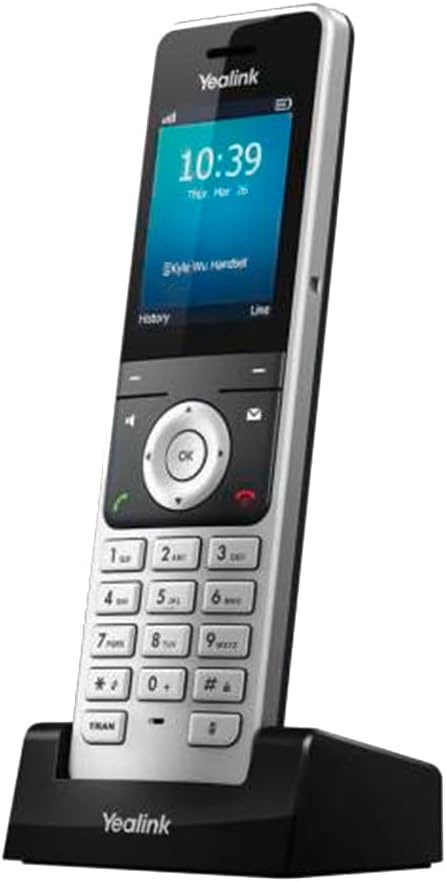
A typical 3-vet small animal practice phone hardware setup: 1 wired reception desk phone, 3 DECT handsets (one per vet), 1 DECT handset for nursing/kennel staff. Total hardware cost approximately $600 to $900 depending on models, including base station.
Practice Management Software Integration
Three veterinary practice management systems commonly used in Australia are ezyVet, RxWorks, and Vetter (rebranded DaySmart Vet after DaySmart acquired Vetter Software in 2021). Each has different VOIP integration capabilities, and understanding what is actually possible is important before signing up with a provider that promises "full PMS integration."
ezyVet
ezyVet is a cloud-based veterinary PMS widely used across Australian small animal and mixed practices. It has a published API and supports third-party integrations. VOIP integration with ezyVet typically takes the form of click-to-dial (dialling client numbers directly from the patient record) and screen-pop (the patient record appears on screen when a known client calls). ezyVet publishes an API, but the architecture and current support for caller screen-pop must be confirmed with both ezyVet and the telephony provider. Confirm API/CTI capability explicitly with any provider you are evaluating if screen-pop is a requirement.
RxWorks
RxWorks is a client-server (on-premise) PMS used in many established Australian practices, particularly those that have been operating for 10 or more years. Because RxWorks runs locally on the practice's own server rather than in the cloud, VOIP integration is more complex. RxWorks telephony integration is provider- and version-specific; confirm whether a supported connector exists and whether any local middleware is required. Some business phone companies have pre-built RxWorks connectors; others leave this as a custom integration project. If your practice runs RxWorks, budget additional time and potentially additional cost for PMS integration compared to a cloud-based PMS.
Vetter
Vetter is now marketed as DaySmart Vet, a cloud-based veterinary practice management system. DaySmart Vet lists named partner integrations; confirm current API, Zapier and telephony support directly with DaySmart before relying on it. Click-to-dial from DaySmart Vet requires a compatible integration or workflow and should be confirmed with both vendors. Full screen-pop requires the same API/CTI capability as ezyVet.
What PMS integration actually delivers in practice: For most vet clinics, the most valuable integration is screen-pop at reception, when a client calls, the receptionist sees their name and their pets' records immediately, without searching. This speeds up the booking process and improves client experience. Click-to-dial from the PMS is a secondary benefit.
If PMS integration is a priority, ask potential business phone companies specifically: "Do you support screen-pop with [PMS name]? Do you have other vet clinic clients using this integration? Can you connect me with one?" A provider that cannot answer these questions with specifics is unlikely to deliver a clean integration.
Regulatory Framework for Australian Vet Clinics
Veterinary practice regulation in Australia is state and territory-based, which means the compliance obligations affecting your phone system setup vary depending on where your clinic operates. There is no single national Veterinary Practice Act.
State-Based Veterinary Practice Acts
The relevant legislation by state and territory:
- NSW: Veterinary Practice Act 2003 (administered by the Veterinary Practitioners Board of NSW)
- VIC: Veterinary Practice Act 1997 (administered by the Veterinary Practitioners Registration Board of Victoria)
- QLD: Veterinary Surgeons Act 1936 (administered by the Queensland Veterinary Surgeons Board)
- SA: Veterinary Services Act 2023 (commenced 1 July 2026, replacing the Veterinary Practice Act 2003)
- WA: Veterinary Practice Act 2021
- TAS: Veterinary Surgeons Act 1987
- ACT: Veterinary Practice Act 2018
- NT: Veterinarians Act 1994
These acts do not typically mandate specific phone system configurations. Their relevance to your phone setup is indirect: they set the professional standard of care obligations that create the context for why emergency call routing matters. Professional expectations differ by jurisdiction. For example, Victoria does not require a practitioner to provide after-hours services but expects clear information on where and how clients can obtain them. The relevant board in each state sets guidance on what constitutes adequate client communication and emergency coverage.
Privacy Act and Client Records
Vet clinics handle personal information (client details) and animal clinical records that may also contain or be linked to personal information about identifiable clients. The Privacy Act 1988 and Australian Privacy Principles apply where the clinic is an APP entity; many businesses with annual turnover of $3 million or less are exempt unless a statutory exception applies.
Key considerations for VOIP deployments:
- Call recording storage: If you record calls, recordings that contain client information (names, addresses, pet medical details) are personal information under the Privacy Act. If the clinic is an APP entity, recordings containing personal information must be protected and used or disclosed only as permitted by the Privacy Act, which is not limited to disclosures made with consent. APP 11 requires that personal information not be retained longer than necessary. Define a retention policy and confirm your business phone company can enforce it.
- Data sovereignty: Call recordings and voicemails stored by offshore business phone companies may be subject to APP 8 (cross-border disclosure). If the clinic is an APP entity, assess whether offshore handling constitutes an overseas disclosure under APP 8; its privacy policy must address likely overseas disclosures and, where practicable, the relevant countries. Prefer providers that store data in Australian data centres.
- Consent for recording: Whether a clinic may record is governed by the surveillance device legislation of its state or territory, and there is no single national rule; using or disclosing a recording is restricted separately again. Our guide to call recording laws in Australia links every Act at the official government registers. Take advice for your own state, and if you record, announce it in your on-hold message or IVR greeting.
Patient Recall Campaigns and Outbound Calling
Annual vaccination reminders, dental health month outreach, and desexing follow-ups are significant revenue drivers for small animal practices. Manual recall calls can use ordinary outbound VoIP calling; automated or high-volume campaigns may require separate dialler or campaign functionality.
Some Australian hosted-PBX providers offer browser-based click-to-dial or paid integration features; confirm availability and pricing on the selected plan. Where available, click-to-dial allows reception staff to work through a recall list and dial out from their work number efficiently. This is sufficient for most small practices doing manual recall campaigns.
Automated outbound calling (where the system dials the list and plays a recorded message) requires a more specialised platform. Dedicated veterinary client communication tools such as PetsApp and VetHero can send automated reminders from your PMS patient data. Channels vary by product and are typically SMS, email and in-app messaging rather than automated voice calls, so confirm voice capability with the vendor if that is specifically what you need. These are separate products to your VOIP phone system and are worth evaluating independently. Most vet clinics find it cleaner to keep automated recall campaigns in a dedicated CRM/communication tool and keep their VOIP system purely for real-time inbound and internal calls.
The Do Not Call Register rules apply where a recall call is telemarketing; ACMA says appointment reminders and rescheduling calls are generally not telemarketing. Marketing email and SMS are regulated under the Spam Act, while telemarketing voice calls are regulated under the Do Not Call framework and associated standards; the applicable consent rules depend on the channel and circumstances. Existing client relationships typically allow direct appointment reminders without explicit marketing consent, but confirm with your privacy policy and any specific client communication consent obtained at registration.
VOIP on NBN: What Vet Clinics Need to Confirm
Most Australian vet clinics are already on NBN or will migrate before the PSTN copper shutdown is complete. VOIP on NBN works well when configured correctly, with two clinic-specific considerations worth confirming before deployment.
Connection type and reliability: FTTP (Fibre to the Premises) is the most reliable NBN connection for VOIP, no copper in the last mile means fewer weather and corrosion-related outages. FTTN (Fibre to the Node) depends on the quality of the copper from the node to your clinic and may have more variability. For a clinic where phone reliability is a genuine safety consideration (after-hours emergencies), FTTP is worth requesting if you are on a lower tier technology.
Battery backup on FTTP: FTTP requires mains power. NBN stopped supplying its optional battery-backup Power Supply Unit in June 2024; clinics should confirm whether an existing unit is present and arrange backup power for the NTD, router and VoIP equipment. This is enough for most short power outages. For longer outages (thunderstorms, planned maintenance), a UPS on your router and VOIP hardware ($150 to $300 for a suitable unit) extends your window. A vet clinic that handles after-hours emergency calls cannot afford a phone system that goes dark the moment the power does.
Mobile fallback: Configure your VOIP system to fall back to a mobile number if the primary VOIP line is unreachable. Many hosted-PBX platforms offer failover options, but supported triggers, destinations and plan availability vary by provider. Set this up proactively rather than discovering it is missing during an outage.
What a Vet Clinic VOIP Setup Actually Costs
Cost breakdown for a typical 2 to 4 vet small animal practice:
Hosted-PBX pricing varies by provider, call plan, user/device licensing and optional features; compare the complete configuration rather than relying on a single per-seat range. A 4-seat practice (reception + 3 vets) costs $100 to $180 per month for service. Call costs are typically included or very low (local and national calls free, mobile calls $0.10 to $0.15/minute).
Hardware:
-- 1 x wired reception desk phone (Yealink T33G or equivalent): $120 to $160
-- DECT base station + 4 handsets: obtain a current bundle quote; the Yealink W76P package itself includes one W70B base and one W56H handset, so three additional handsets are required.
-- UPS for router and hardware: $150 to $300
Total hardware (one-off): $550 to $910
Setup and number porting: Most providers charge $0 to $100 for setup. Number-porting fees vary by provider, number type and port complexity; obtain a written quote. ACMA says individual local-number ports generally take 8 to 15 business days, while more complex ports can take up to 30 business days.
Using the component ranges stated above, total first-year cost is $1,750 to $3,170 before number-porting fees. From year two, ongoing service costs $1,200 to $2,160 per year.
Common Mistakes Vet Clinics Make with Phone Systems
Using the same number for appointments and after-hours emergencies. One number for all call types is the default for most small practices, and it creates genuine risk. Emergency callers need to reach a person or a specific referral pathway. Appointment callers reaching the emergency line at 2am creates noise and disruption for on-call staff. Separate numbers, or a well-configured IVR that separates them on the same number, are both workable. The same number with no separation is not.
Manual after-hours switching. Any system that requires a staff member to press a button or flip a setting at close of business will eventually fail. Time-based routing that switches automatically at a configured time is the only reliable approach. Most cloud business phone companies support this as a standard feature.
Forgetting to test the after-hours routing. Set up the after-hours configuration, then call your own clinic number at 6pm and go through the IVR. Does it say the right thing? Does pressing 1 for emergencies actually connect to the on-call number? Most clinics configure this once at setup and never test it again. Test it quarterly, and every time your after-hours referral arrangement changes.
Using a personal mobile as the on-call number without failover. On-call vets sometimes turn their phone off, run out of battery, or travel into poor coverage. A VOIP system that routes directly to a single mobile with no failover leaves no safety net. Configure and test provider-supported no-answer or unreachable failover to a second destination; behaviour and ring timing for external mobiles vary by platform and mobile service.
Choosing a business phone company with no local presence or veterinary clients. Generic small business business phone companies can technically deliver a working system, but support staff who have never configured emergency routing for a healthcare environment will take longer to get your IVR right. Providers with existing veterinary practice clients understand the after-hours triage requirement without it needing to be explained from scratch.
Buying hardware before choosing a provider. VOIP handsets need to be provisioned to a specific provider's SIP platform. Buying Yealink phones and then finding your preferred provider does not support them (or charges extra for provisioning) is a common and avoidable mistake. Choose your provider, confirm your hardware on their approved list, then purchase.
Hardware quick links: The desk phones and DECT systems referenced in this guide have dedicated Australian reviews with current pricing: Yealink T33G review (reception desk phone, ~$120 to $160), Grandstream GRP2602P review (budget desk phone, Australian availability is limited so see the review for current sourcing), and Yealink W76P review (DECT base station for multi-room coverage, ~$199). All prices include GST and are updated regularly from Australian retailers.
Healthcare environments have overlapping VOIP requirements regardless of the patient type. If you operate across aged care, disability services, or residential care settings, our guide to VOIP for aged care in Australia covers the compliance obligations, emergency call routing standards, and resident privacy requirements specific to those environments.
Do I need a separate phone number for after-hours emergencies?
Not necessarily. A single number with a well-configured time-based IVR can separate emergency callers from appointment callers using a keypad menu (press 1 for emergencies, press 2 for non-urgent queries). A separate dedicated emergency line is cleaner and less prone to configuration errors, but it means promoting two numbers to clients. Most practices find a single number with a clear after-hours IVR more practical. The critical requirement is that the emergency pathway never goes to an unmanned voicemail.
Can I integrate my VOIP system with ezyVet or RxWorks?
ezyVet supports third-party VOIP integration via its API, screen-pop (client record appears when they call) and click-to-dial are achievable with providers that support CTI/API connectivity. RxWorks is an on-premise PMS and requires a local middleware connector for integration, which is more complex. Confirm with any business phone company you are evaluating whether they have specific ezyVet or RxWorks integration experience, and ask for references from other veterinary practice clients.
What happens to my VOIP phones if the power goes out?
VOIP phones need power (either via the wall adapter or PoE from the router). If power fails, they go offline along with everything else. Mitigation options: a UPS ($150 to $300) that powers your router and phone hardware for 2 to 4 hours during outages, and a mobile fallback configured in your VOIP system so calls automatically reroute to a mobile if the primary line is unreachable. Some older FTTP premises have a separate optional NBN battery-backup Power Supply Unit, but new units are no longer supplied by NBN; the router and VoIP equipment still require their own backup power.
Do the state Veterinary Practice Acts require a specific phone setup?
No Australian state or territory Veterinary Practice Act prescribes specific phone system requirements. However, professional standards guidance from state veterinary boards sets expectations around accessible client communication and after-hours emergency coverage. A phone system that fails to route emergency calls appropriately may be relevant context in a professional standards complaint, even if it does not directly breach a specific provision of the act.
Can I keep my existing clinic phone number when switching to VOIP?
Yes. Number porting transfers your existing geographic or 13/1300 number to the new business phone company. An individual geographic-number port generally takes 8 to 15 business days; a complex port may take up to 30 business days. During the porting window, run your new VOIP system on a temporary number, test all routing thoroughly, and only initiate the port once you are confident the new system works correctly. Do not port and configure simultaneously.
How many phone lines does a vet clinic actually need?
Size external concurrent-call capacity from measured busy-hour usage and the provider's licensing model; distinguish seats/extensions, external call channels and internal extension calls. Larger practices should size concurrent external calls from busy-hour call data, queue design and provider-specific channel rules rather than veterinarian count alone. Hosted-PBX licensing varies: providers may charge by user, device, call plan or concurrent channel. Confirm how simultaneous internal and external calls are counted before sizing the service.
Is call recording allowed for vet clinics?
There is no single national rule. Call recording is governed by the surveillance device legislation of each state and territory, and using or disclosing a recording is restricted separately again. Our guide to call recording laws in Australia sets out where each jurisdiction sits and links every Act at the official government registers, and the OAIC covers the privacy side. For your own clinic, take advice from a qualified solicitor. The practical steps do not change either way: announce recording in the IVR greeting or on-hold message, confirm the announcement plays before recording starts, and store recordings containing client or patient information securely, retained only as long as they are needed.
Your Next Steps
1. Map your call types. Before talking to any provider, document: how many inbound calls per day, what the after-hours emergency arrangement is (on-call vet, referral centre, or both), whether staff need to receive calls in clinical areas, and which PMS you run. This takes 20 minutes and saves significant time in provider conversations.
2. Confirm your NBN connection type. Log into your ISP account or call them. If you are on FTTN with a below-average line, understand the quality implications for VOIP before committing to a cloud phone system. Most suburban clinics on FTTP have no issues.
3. Choose a provider before buying hardware. Shortlist two or three Australian cloud phone system companies (see our guide to the best VOIP phone system for small business in Australia), confirm they have vet clinic clients, and check their approved hardware list. Then buy hardware.
4. Configure and test after-hours routing before going live. Set up your business hours / after-hours profiles, record your IVR message, configure the emergency pathway. Then call your own number from a mobile at the configured after-hours time and walk through every option. Fix what does not work before porting your main number.
5. Port your number last. Run the new system on a temporary number for at least one week while the old system remains live. Confirm call quality, routing, and voicemail are all working. Then initiate the port. An individual local-number port generally takes 8 to 15 business days; a complex port may take up to 30 business days, so plan your cutover for a low-volume period if possible.
For a broader comparison of VOIP versus keeping your current landline or ISP phone adapter, see our guide to VOIP vs traditional phone in Australia.
If you're not sure how to configure after-hours emergency routing for your clinic, or which cloud phone system handles vet clinic requirements best, tell us your clinic size and what your current setup looks like. We'll give you a specific recommendation. We reply personally, usually within one business day.
Every business is different. Tell us your current setup and what you are trying to achieve. We reply personally, usually within one business day.
Ask a Question