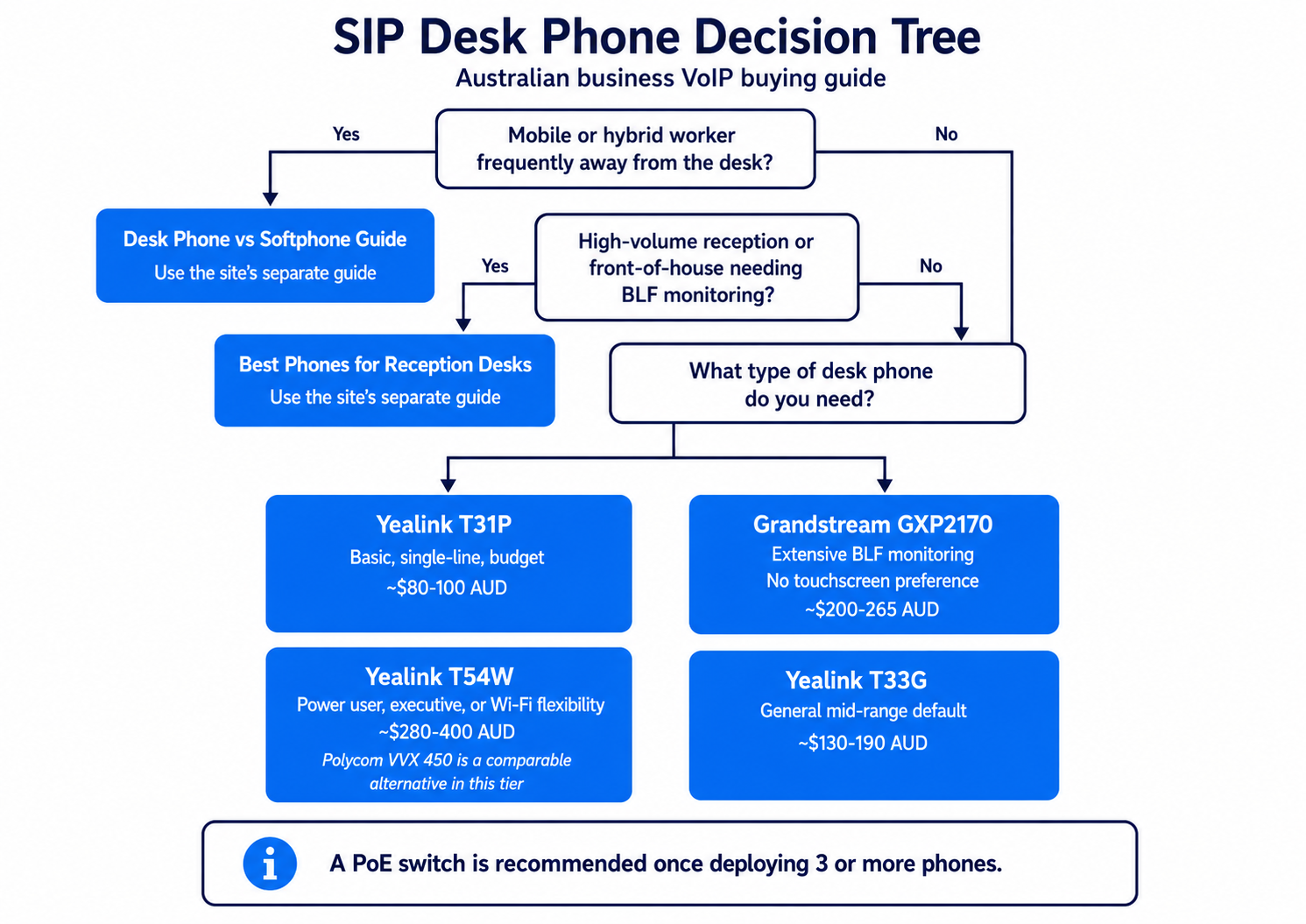
Our Top SIP Desk Phone Picks for 2026
| Yealink T31P | Yealink T54W | Grandstream GXP2170 | Poly Edge E450 | Yealink T33G | |
|---|---|---|---|---|---|
| SIP Accounts | 2 | 16 | 6 | 8 keys / up to 32 SIP | 4 |
| Screen | 2.3" greyscale | 4.3" colour | 4.3" colour | 3.5" + 2.4" colour | 2.4" colour |
| PoE | Yes | Yes | Yes | Yes | Yes |
| Best For | Basic reception desk or single-line office | Power users, reception, small contact centre | Multi-line office desk, feature-rich mid-range | Multi-line desk, hot-desking, reception | General office, mid-range |
| Est. Price (AUD) | ~$80-100 | ~$280-400 | ~$200-265 | ~$373 | ~$130-190 |

Do You Actually Need a Desk Phone? The Softphone Alternative
Before investing in desk phone hardware, it is worth asking whether your team actually needs physical handsets. A softphone is a software application that runs on a computer, tablet, or mobile phone and connects to your cloud phone system exactly as a desk phone would. Staff can make and receive business calls through the app using a headset plugged into their device. For some business contexts, softphones are not just a cheaper option but a better one.
Softphones work best for staff who spend most of their day at a computer and whose calling is relatively low-volume or intermittent. Sales staff who make outbound calls using a headset, remote workers whose primary communication is digital with occasional voice calls, and office staff who handle calls as part of a broader administrative role are all good softphone candidates. The call quality through a quality USB headset on a decent computer is comparable to a desk phone, and setup cost may be low where the existing plan includes a softphone entitlement and suitable devices and headsets are already available.
Desk phones remain the better choice for roles where calls are the primary activity. Receptionists handling high inbound call volumes, call handlers who need to transfer calls quickly using physical buttons, staff in environments where computer screens are occupied with other tasks, and any role where the physical phone is picked up and put down repeatedly throughout the day, all benefit from the ergonomics and reliability of a dedicated handset. The speed and muscle-memory of a physical keypad for transferring, holding, and conferencing calls is difficult to replicate in a softphone UI during high-pressure call handling.
Some cloud phone system plans include softphone apps, while others charge separately or limit them by plan; confirm licensing with the provider. Before buying desk phones for all staff, consider starting with softphones for roles where calls are not the primary function. You can always add desk phones selectively for the roles where they deliver the most value, rather than buying hardware for everyone from day one.
What Makes a Good SIP Phone for Australian Business?
For Australian businesses deploying a cloud phone system phone system, the most important SIP phone criteria are: Power over Ethernet (PoE) support, which eliminates the need for separate power adapters; G.722 wideband codec support for HD audio quality on good NBN connections; compatibility with your cloud phone system company's auto-provisioning system; and screen size appropriate for the number of lines and features you need.Power over Ethernet (PoE): Why It Matters
Power over Ethernet allows the phone to receive power through the Ethernet cable that also carries network data. This eliminates the need for a power adapter at each desk and simplifies cabling. During a power outage, calls can continue only if the PoE switch and the rest of the required network path-including the router, modem and any NBN connection equipment-remain powered and the service remains available. All the phones in our recommended list support PoE.Yealink T31P: Best Entry-Level SIP Phone
The Yealink T31P is a commonly available entry-level SIP phone for Australian businesses. It handles 2 SIP accounts, has a 2.3-inch greyscale display, supports G.722 HD audio, and is PoE-powered. Setup time can be reduced when the provider supports auto-provisioning for the exact Yealink model and firmware. At roughly $80-100 AUD, it is the obvious choice for a general office desk where the user makes and receives standard calls.Yealink T54W: Best Mid-Range SIP Phone
The Yealink T54W supports 16 SIP accounts, has a 4.3-inch colour display, built-in Wi-Fi and Bluetooth, and 27 programmable DSS keys. It is the standard recommendation for reception desks, executive desks, and any user who handles high call volumes or monitors multiple extensions. Its built-in Wi-Fi allows network placement without an Ethernet run, but the phone then requires a compatible AC power adaptor, which may be sold separately; Ethernet with PoE is generally preferred for reliability.Grandstream GXP2170: Best Feature-Rich Mid-Range Option
The Grandstream GXP2170 offers 6 SIP accounts, a 4.3 inch colour screen, 48 virtual BLF (Busy Lamp Field) keys, and PoE support. It is a strong alternative to the Yealink T54W for users who want extensive BLF monitoring of other extensions without the touch-screen interface. Grandstream is well-supported by Australian cloud phone system companies for auto-provisioning.DECT Cordless Phones for Australian Business
DECT (Digital Enhanced Cordless Telecommunications) is the standard technology for cordless business phones in Australia. Unlike WiFi phones (which connect to your WLAN), DECT phones use a dedicated radio frequency designed specifically for cordless telephony, while their range and call quality relative to WiFi depend on the deployment environment.
DECT systems for business consist of a base station (connected to your network via Ethernet) and one or more cordless handsets. The handsets roam freely within radio range of the base station (typically 30 to 50 metres indoors). For small businesses where staff move around the office, a DECT system eliminates the "missing a call because I was not at my desk" problem without requiring a mobile phone or a softphone setup. Reception staff who move between a desk and a counter, warehouse or workshop staff who occasionally take calls, and small offices with open floor plans all benefit from DECT flexibility.
DECT phones for VoIP (sometimes called IP-DECT) connect via SIP to your cloud phone system, exactly like a desk phone. Popular options compatible with Australian VOIP deployments include the Yealink DECT range and the Gigaset series. Confirm SIP compatibility with your provider before purchasing, as some DECT systems are proprietary and will not register with third-party cloud phone system platforms. Pre-configured DECT options are less commonly available than for desk phones, so factor in configuration effort if you are deploying DECT without IT support.
Australian Provisioning Notes
The phones above support standard provisioning methods, but auto-provisioning and support vary by provider, model, firmware and purchase channel; confirm the exact handset with the provider before purchase. Before purchasing, confirm with your cloud phone system company that they support your chosen phone model and can supply a provisioning URL or configuration file. Pre-configured phones are available from some cloud phone system companies and are the lowest-friction option for businesses without IT staff.For businesses deploying an on-premise PBX, all the phones above support manual SIP configuration via their web interface.The simplest path for a small business without IT staff is to order phones through your cloud phone system company. Provider-supplied pre-provisioned phones usually reduce handset configuration, but successful installation still depends on a compatible network, power and provider-supported hardware. Manual configuration is worth understanding for adding phones later, but for the initial setup, pre-provisioned phones are the right choice for most SMBs.Where to Buy SIP Phones in Australia
SIP phones for Australian business deployments are available through several channels, each with different trade-offs on price, warranty, pre-configuration, and support.
Buying through your business phone company is typically the simplest option for a small business. Providers who sell or supply phones have pre-configured provisioning profiles for their platform, meaning phones arrive with your SIP credentials loaded and are ready to plug in. The hardware price is usually comparable to or slightly above retail, but the time saved on configuration and the peace of mind that the hardware is confirmed compatible with your specific plan is often worth the difference. If something goes wrong, you have one support number for both the service and the hardware.
Australian distributors and resellers supply SIP phones through IT channel partners and direct to businesses. Yealink Australia, Grandstream through AU distributors, and brands like Polycom (now Poly) are available through IT resellers. Pricing is typically competitive with international sources, and Australian Consumer Law consumer guarantees may apply to eligible business purchases from Australian sellers; these rights are separate from any manufacturer warranty. If you have an IT contact who can handle configuration, buying through a distributor and having your provider's IT team configure the phones remotely is a practical path for medium-size deployments.
If you are comparing Poly and Yealink directly, our Poly VVX vs Yealink comparison covers the key differences in detail.Amazon Australia carries a range of SIP phones from major brands and is useful as a price reference point. However, some listings are parallel-import or international stock: Australian Consumer Law consumer guarantees still generally apply against the business seller, but manufacturer warranty coverage may differ and can be harder to enforce against an overseas seller. Phones purchased through Amazon may also require manual setup unless your provider supports auto-provisioning for the exact model and can enrol the handset. For a business deploying four or more phones without IT staff, the configuration burden makes Amazon a less practical primary source, despite the competitive pricing. Check current pricing on Amazon AU as a market reference, then compare against what your provider charges for pre-configured hardware.
ACMA compliance note. For SIP phones supplied in Australia, the responsible supplier must determine and meet the applicable compliance requirements, including demonstrating compliance, maintaining records, registering as required and using the RCM compliance label. Depending on the applicable labelling rules, the RCM may appear on the device, electronically, on its packaging or through a linked display. Australian distributors and reputable online retailers sell compliant stock. Grey market imports from international sources may not carry RCM marking, so checking for the mark before purchasing can help confirm the device meets applicable Australian compliance requirements.
Headsets: The Accessory That Matters More Than the Phone
For staff who spend more than 30 minutes per day on calls, a quality headset makes a bigger difference to comfort and productivity than upgrading to a more expensive desk phone. Many business SIP phones support EHS, letting staff answer and hang up calls from the headset without touching the phone, but compatibility and the required adaptor are model-specific.Budget option: Wired USB or 3.5mm headset pricing varies by model and retailer; check current AU pricing for the Jabra Evolve2 30 and Poly Blackwire 3200 series rather than assuming a $50-80 range. Reliable, no charging needed, good for desk-bound staff.Wireless DECT headset options include the Jabra Engage range; the Plantronics CS500 series is discontinued and should be treated as legacy equipment. Range of 30-100 metres, staff can walk around while on calls. Ideal for office managers and anyone who moves between desks.Important: Check that your chosen headset is compatible with your desk phone model. Yealink EHS adapter support is model-specific: the T54W and T43U use EHS40, while the T31P and T33G use EHS35. Grandstream uses a different connector. Your business phone company can confirm compatibility before you buy.Future-Proofing Your SIP Phone Hardware Investment
SIP desk phones have a long service life. , because the SIP standard is stable and the phones receive firmware updates that maintain compatibility with modern cloud phone system platforms. SIP phones can remain usable for several years, but useful life depends on hardware condition, firmware support, security requirements and provider compatibility.
The primary factor in future-proofing is choosing phones from manufacturers with a track record of long-term firmware support. Both manufacturers currently publish firmware for some older models, but update frequency and end-of-support dates vary by model. Avoid lesser-known brands whose firmware development history is unclear, because a phone that stops receiving updates within two to three years may lose compatibility with cloud phone system platforms that update their security requirements.
Buying mid-range rather than entry-level also extends the useful life of your investment. An entry-level phone with two SIP accounts and a monochrome screen will serve a basic calling role adequately, but may become a constraint if your business grows and staff need to manage multiple lines or park calls. A mid-range phone with a colour screen, six or more line keys, and Bluetooth headset support handles growth scenarios without requiring hardware replacement. The incremental cost difference between entry-level and mid-range (typically $100 to $150 per handset at Australian retail prices) is modest compared to the disruption of a hardware refresh cycle.
What Most Buyers Get Wrong
1. Buying the phone before choosing a provider. Buying the phone before choosing a provider can be an expensive mistake. Your business phone company determines which phones work, how they are configured, and what features you can use. Many providers supply pre-configured phones as part of their service. If you buy independently, you may end up with hardware that is incompatible, unconfigured, or unsupported.2. Over-specifying features. A receptionist needs a phone with BLF (Busy Lamp Field) keys, a colour screen, and EHS headset support. A general office worker needs a basic two-line phone. Buying a $400 phone for someone who takes 5 calls a day is a waste. Match the phone to the role.3. Ignoring PoE (Power over Ethernet). Phones that support PoE are powered through the Ethernet cable, eliminating the need for individual power adapters at each desk. This requires a PoE switch ($100-300 for 8 ports), but dramatically simplifies installation and reduces cable clutter. If you are buying more than 3 phones, PoE is worth the investment.Your Next Steps
1. Choose your business phone company first. They will recommend compatible phones and may supply pre-configured hardware. See our phone system guide for provider recommendations.2. Map phones to roles. Receptionist, general office, executive, warehouse, mobile worker. Each role has different requirements.
3. Decide on PoE. If buying 3+ phones, invest in a PoE switch to simplify deployment.
4. Check warranty and returns. Under Australian Consumer Law, products must be fit for purpose. If an eligible business purchaser is sold a phone advertised as compatible with their provider and it is not, ACL remedies may apply: a major problem generally lets you choose a refund or replacement, while for a minor problem the seller generally has the chance to repair it first.
5. Consider softphones for mobile workers. Staff who are frequently away from their desk may be better served by a softphone app on their mobile than a desk phone.
6. Budget for headsets. If staff are on calls frequently, a quality headset ($50-150) makes a bigger difference to call comfort than a more expensive phone.Need help choosing? Get a free recommendation and we will suggest phones based on your provider, team size, and roles.
Before committing to desk phones, it is worth comparing them against softphones, especially for teams with remote or hybrid staff. Our guide covers the full desk phone vs softphone comparison with honest trade-offs for Australian businesses.
Reception desks have different requirements from standard desk phones, higher call volume, BLF monitoring, and multi-line handling are essential. For picks focused specifically on front-of-house use, see our guide to the best phones for reception desks in Australia.
A good headset can make a significant difference to call quality and comfort for staff on the phones all day. See our guide to the best headsets for VOIP office use in Australia, covering wired, wireless, USB, and RJ9 options.
Even well-regarded SIP phones occasionally have quirks with specific providers, codec mismatches, DTMF issues, or provisioning gaps. Our Phone Compatibility Checker gives a preliminary category-level indication; confirm the exact model, firmware and provider support before ordering.
For a focused look at this model, see our full Yealink T31P review for Australia, covering specs, NBN call quality, and AU pricing.
The T33G is our top recommendation for most Australian SMB desks. See our full Yealink T33G review with AU pricing, discussion of NBN call-quality factors, and a direct comparison with the T31P and T43U.
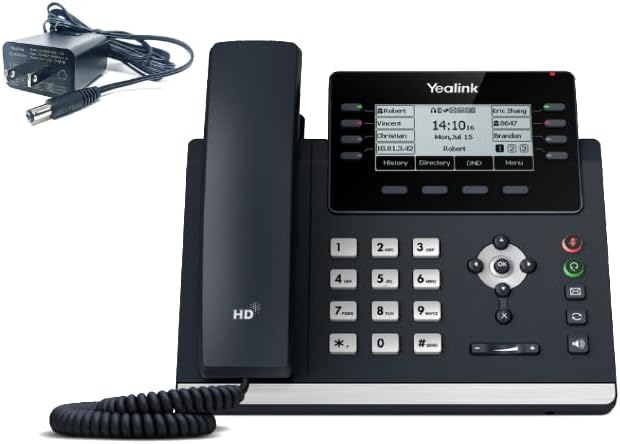
For high-call-volume desks and team leads, the T46U delivers a large colour screen and 27 DSS keys. Our full Yealink T46U review for Australia covers the specs, BLF setup, and when to choose it over the T54W.

The T54W is Yealink's mid-level Prime Business Phone with built-in Wi-Fi and Bluetooth, requiring no wireless dongles for those functions. See our full Yealink T54W review for Australia with discussion of NBN call-quality factors and a comparison with the T46U.
For Grandstream deployments at entry level, the GRP2602P is the correct choice. Our Grandstream GRP2602P review for Australia covers the GRP series, AU pricing, and a head-to-head comparison with the Yealink T31P.
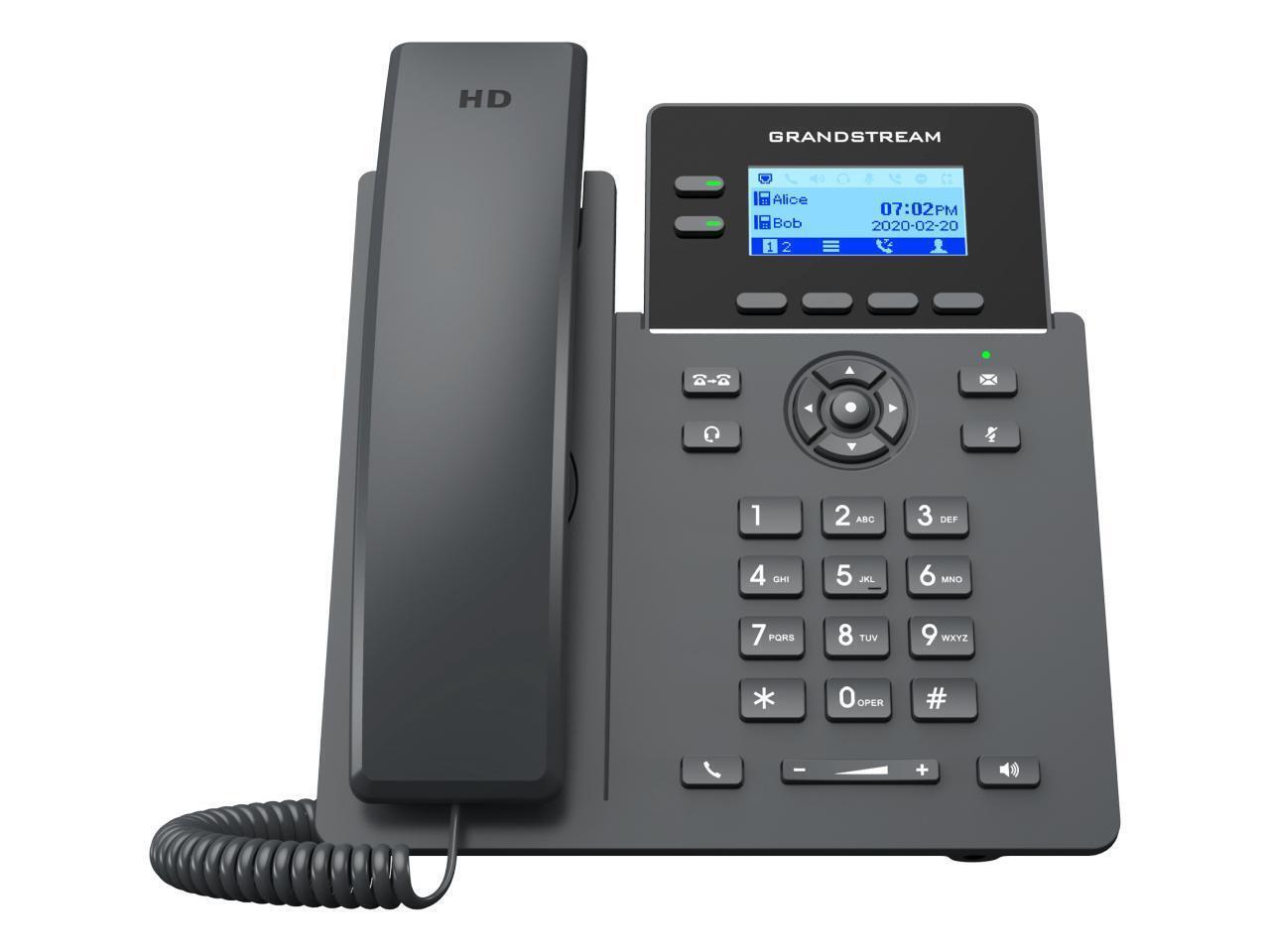
The GXP2170 remains available from some Australian sellers, but stock varies by retailer. Our full Grandstream GXP2170 review covers its 48 BLF keys, AU retailer availability, and when to choose it over the newer GRP2670.

For desks where a headset is the primary call interface, the Yealink T43U offers dual USB ports and Bluetooth support via an optional BT40, BT41 or BT52 Bluetooth dongle. See our full Yealink T43U review for Australia with AU pricing and a comparison with the T33G and T46U.
For desks where Ethernet is not available, the Yealink T44W adds built-in dual-band Wi-Fi and Bluetooth to the T43U feature set.
The Grandstream GRP2634 is a mid-range model with eight line keys, support for up to 12 SIP accounts on current firmware, 32 virtual multipurpose keys and 10 multipurpose keys; BLF availability depends on how those keys and the PBX are configured. Our Grandstream GRP2634 review for Australia compares it to the Yealink T33G and covers AU availability.
For supervisory positions needing more BLF monitoring capacity, the Grandstream GRP2636 steps up to 16 SIP accounts and 24 BLF keys.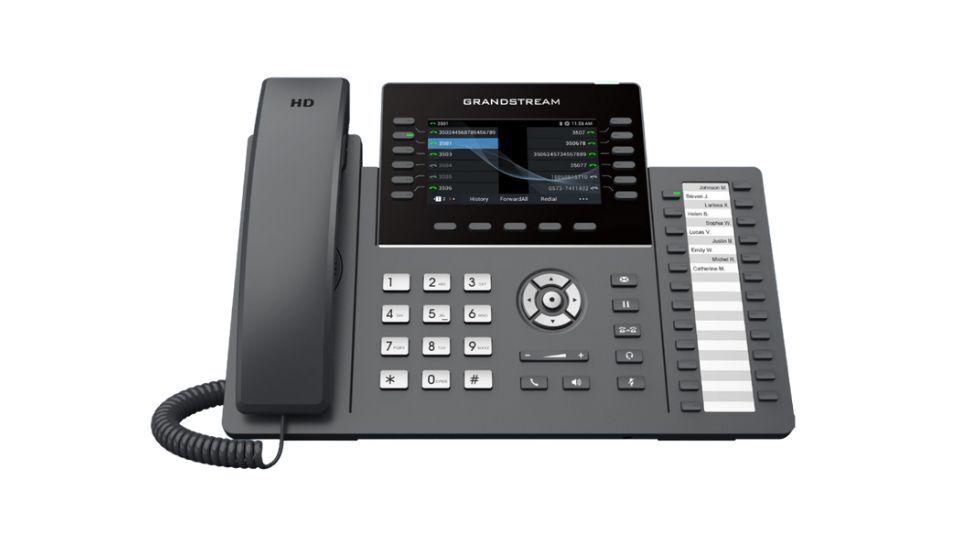
The current GRP2670 specification lists 48 virtual multipurpose keys, which can be configured for functions including BLF, and a 7-inch colour touchscreen. See our full Grandstream GRP2670 review for Australia with a comparison to the GXP2170 and Yealink T46U.
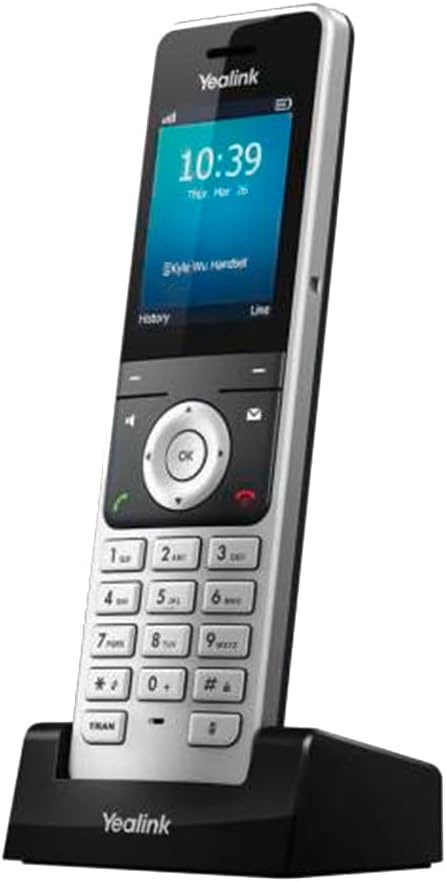
For businesses that need true cordless mobility , warehouses, clinics, retail floors, or any site where staff move between areas , the Yealink W76P DECT system is our recommended option. Our full Yealink W76P review covers range, call quality, base station capacity, and how it compares to wired alternatives for mobile-heavy roles.
Once you have chosen a model, the next step is getting it registered and working. Our new IP phone setup guide walks through the full process: business phone company selection, SIP credentials, Ethernet connection, auto-provisioning vs manual setup, and troubleshooting if the phone shows "Not Registered".
What Should You Expect to Pay?
Entry-level SIP desk phones for a small office or reception desk cost $70-120 (inc. GST) in Australia. Mid-range pricing varies substantially by model and can exceed $200; use current model-specific Australian listings. High-end executive phones with large colour touchscreens, Bluetooth, and advanced call handling sit at $250-450. These are one-off hardware costs. The ongoing cloud-phone cost varies by provider, plan structure, included calls, licences and support; some current PAYG plans are below this range, while bundled plans may fall within or above it. Whether buying a SIP phone is more cost-effective than renting handsets depends on the handset price, provider rates, contract terms, and included support.
If you have settled on a Yealink or Grandstream model and need to confirm which AU VOIP providers support auto-provisioning for those phones, see our dedicated guide to VOIP providers that work with Yealink and Grandstream phones in Australia.
For offices that want Gigabit connectivity across every desk port, the Yealink T31G is the entry-level option. It covers the same 2-line use case as the T31P with a Gigabit switch port instead of Fast Ethernet. See our full Yealink T31G review for Australia -- specs, AU pricing, and when the Gigabit difference actually matters.
For a 7-inch touch screen without the cost of built-in wireless, the Yealink T48U offers the largest display in the T-series on a cabled connection. Our Yealink T48U review for Australia covers the specs, a T48U vs T57W comparison, and the environments where it makes sense over the wireless-capable T57W.
Yealink's T8 series brings updated hardware to the wireless desk phone category. The T85W is the 5.5-inch entry in the new range -- larger than the T54W's 4.3-inch screen with the same built-in Wi-Fi and Bluetooth. See our Yealink T85W review for Australia covering specs, AU pricing, and where it sits relative to the T54W and T87W.
The T87W is a T8-series Prime Business Phone with a 7-inch touchscreen, built-in Wi-Fi 6 and Bluetooth 5.0, and 16 SIP accounts; Yealink's T88 series is its current flagship SIP desktop line. Our Yealink T87W review for Australia covers the T87W vs T57W decision and AU pricing.
Beyond Yealink and Grandstream, we also review Fanvil and Snom desk phones. The Fanvil V65 builds in Wi-Fi and Bluetooth, and the Fanvil X6U adds two extra screens for busy reception desks. The Snom D717 is a simple wired phone, while the Snom D865 pairs Bluetooth and Wi-Fi with a 5-inch screen. Each is tracked at only a small number of Australian retailers for now, so confirm stock before you plan around one.
Do I need a SIP phone or can I use a softphone?
Will my existing analogue phones work with a VoIP system?
What is BLF (Busy Lamp Field) and do I need it?
How long do SIP desk phones last?
Can I use any SIP phone with any business phone company?
What is the difference between a SIP phone and a VoIP phone?
Do I need a PoE switch to use SIP desk phones?
Try our free tools
Get specific numbers for your business with our VOIP Cost Calculator and Phone System Sizing Wizard.
Related reading:
- cordless DECT phones for business
- VoIP cost breakdown
- best business phone companies
- Browse all Yealink phones with current Digiphone pricing and stock.
Need Help Choosing Phones for Your Business VoIP Setup?
Get a Recommendation