How Hosted PBX Providers Compare: Feature Tiers at a Glance
Before diving into evaluation criteria, it helps to understand what different price tiers typically deliver in the Australian cloud phone system market. The table below covers four common provider categories. These are generic tier descriptions, not specific vendor recommendations.Australian cloud phone system company Tiers
| Budget cloud VOIP ($15-25/user/mo) | Mid-tier cloud phone system ($30-50/user/mo) | Full-featured cloud PBX ($50-80/user/mo) | Enterprise/MSP-managed ($80-120+/user/mo) | |
|---|---|---|---|---|
| AU geographic numbers (02, 03, 07, 08) | Most yes | Yes | Yes | Yes |
| 1300 / 1800 number support | Limited or add-on | Usually included | Yes, full support | Yes, full support |
| Number porting (inbound) | Basic, may outsource | Standard AU porting | Full service, complex ports | Full service + SLA |
| Mobile app / softphone | Basic or third-party | iOS + Android app | Quality iOS + Android app | Full UC client |
| Hardware flexibility (bring your own SIP phone) | Often restricted | Most support standard SIP | Yes, open SIP | Yes, managed config |
| Support hours | Email / ticket only | Business hours AU | Business hours + priority | 24/7 or dedicated account |
| Contract terms | Month-to-month typical | Month-to-month or 12mo | 12mo standard, MTM option | 12-24mo, negotiated |
| AUD billing | Not always | Yes | Yes | Yes |
What Makes a hosted PBX provider Good for Australian Businesses
Providers differ in Australian-number availability, porting arrangements, billing currency, support coverage and regulatory obligations; verify these points directly. That shows up in specific ways: limited AU number availability, slow or broken porting processes, USD billing, overseas support teams with no familiarity with NBN infrastructure, and missing ACMA compliance. The criteria below are the ones that separate an AU-native or AU-capable provider from one that is simply available in Australia. For a comparison of cloud and on-premise approaches, see our cloud vs office phone system guide.1. Australian Phone Number Support
A genuine Australian cloud phone system company should offer local geographic numbers across all state codes (02 NSW/ACT, 03 VIC/TAS, 07 QLD, 08 WA/SA/NT) as standard, not as a special order. Beyond geographic numbers, 1300 and 1800 numbers are a common business requirement in Australia. Not all providers support these equally. Some offer 1300 and 1800 numbers only as paid add-ons; others include them as part of standard plans. If your business relies on a 1300 number for a professional national presence, confirm the provider can supply it, what ongoing call costs apply (1300 calls are not free to receive; 1800 calls to your business are charged to you), and confirm which carrier or carriage service provider supplies the 1300 or 1800 service and that the applicable numbering, portability and TIO obligations are met. See the cloud PBX guide for more on how AU number provisioning works with hosted systems.2. NBN Call Quality and Codec Support
Australia's NBN infrastructure introduces call quality variables that do not exist in the same way on other national broadband networks. The codec a provider uses determines how much upload bandwidth each call consumes and how gracefully it handles jitter and packet loss. G.711 is a 64 kbps narrowband PCM codec and can use about 87 kbps per call under common Ethernet/RTP assumptions; suitability depends on simultaneous calls, available upstream capacity and competing traffic. G.729 compresses significantly (around 31 kbps) but can degrade quality on poor connections. Opus is a scalable codec whose bitrate and audio bandwidth can be adapted, where the provider and endpoint support it. A quality AU provider should support at least G.711 and G.729, with Opus support a positive differentiator. Ask specifically whether the provider supports codec negotiation at the account level, not just at the phone hardware level. On FTTP connections with symmetrical upload, G.711 is ideal. On FTTC or FTTB connections where upload is the bottleneck, G.729 or Opus gives you more headroom. For more detail on how NBN connection type affects VOIP call quality, see the VOIP call quality guide.3. Number Porting: How Smoothly Does the Provider Handle AU Ports?
Number porting in Australia is governed by ACMA's number portability framework, and Category A is the default automated process for numbers associated with simple telephone services. Category C requires manual processing coordination and is the default process for numbers associated with complex telephone services.. For Category A ports, 80% complete within 8 business days, 90% within 10, and 98% within 15. Category C ports have targets of 80% completed within 15 business days, 90% within 20 and 99% within 30, subject to the exclusions in C540:2023. Because they require manual coordination, the cutover and reversal arrangements should be confirmed in advance. A good cloud phone system company understands this distinction and handles both types. Red flags: providers who cannot tell you what category your existing number falls into, who quote you a single flat porting timeline regardless of number type, or who subcontract the port to a third party with no direct visibility. Porting your existing number is often the riskiest part of a VOIP migration. The provider should give you a clear timeline, explain how calls are handled during the transition, and have a rollback plan. For a full breakdown of AU porting rules and timelines, see the number porting Australia guide.4. Feature Completeness Without Add-On Fees
The core features that every business phone system needs should be included in a standard plan, not charged separately. The list includes: auto-attendant (IVR), ring groups, call recording, voicemail-to-email, hold music, after-hours call routing, and basic reporting. Some providers advertise low per-seat prices and then charge add-on fees for call recording, for additional ring groups, or for the auto-attendant feature. By the time you add the features your business actually needs, the effective cost is often significantly higher than a slightly more expensive provider that bundles everything. Before committing, request a full feature list for the plan you are considering and ask explicitly which features incur additional charges. Also check whether there are limits on commonly used features: for example, some providers limit call-recording storage; that may be insufficient where a business has applicable retention obligations, so confirm the required retention period for your circumstances.5. Mobile App and Softphone Quality
If any of your staff work remotely, attend client sites, or use a mobile as their primary device, the quality of the provider's iOS and Android app matters considerably. A good mobile app should let users make and receive calls on their business number, access the full PBX feature set (transfer calls, access voicemail, use ring groups), and maintain reliable audio quality on 4G/5G mobile data connections. Poor mobile apps are a common complaint across the VOIP industry. Signs of a weak mobile offering: apps that require a VPN to function, apps that drop calls when switching between WiFi and mobile data, apps with frequent crash reports in the App Store or Google Play, and apps that cannot access the same call history as desktop users. If your business relies on mobile workers, ask the provider for a trial period specifically to test the mobile app on your network conditions. Some providers offer a separate softphone client for desktop use as well, which is worth evaluating if your team uses laptops as their primary devices. See the desk phone vs softphone guide for help deciding which approach fits your team.6. Hardware Compatibility: Open SIP vs Proprietary Lock-In
Standard SIP-compatible phones may work with services that permit generic SIP registration, but compatibility, firmware support and provisioning must be confirmed for the exact provider and handset model. Some providers support open SIP and will supply you with a configuration file or auto-provisioning credentials that you can use with any compatible handset. Others restrict you to their own branded hardware or a specific approved list, which limits your options and typically means paying a markup on the hardware itself. Proprietary handset lock-in is not always disclosed upfront. Ask directly: will the service work with a Yealink T31P or Grandstream GXP2160 that you already own or purchase independently? If the answer involves a lengthy approval process or a fee for custom configuration, that is a hardware lock-in situation. For businesses that already own SIP-compatible handsets from a previous system, open SIP compatibility can save hundreds of dollars on hardware costs. For new buyers, the hardware cost difference between a provider-supplied handset and an independently sourced equivalent is worth checking before you commit.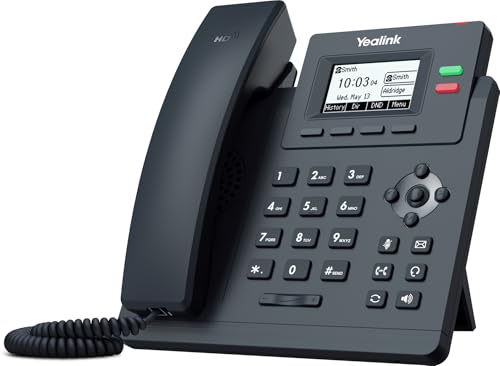
7. Contract Terms and Exit Conditions
cloud phone system contracts in Australia range from month-to-month to 24-month lock-in arrangements. Month-to-month is the lowest risk: if the provider's quality degrades or your business needs change, you can leave without penalty. Longer contracts sometimes offer a price discount, but weigh that against the exit cost if the relationship does not work out. Key things to check in any contract: early termination fees (these can run to the full remaining contract value), auto-renewal clauses (some contracts auto-renew for another full term unless you cancel within a specific window, which can be as short as 30 days before renewal), and what happens to your numbers if you leave. Telephone numbers are a national resource rather than customer property. Customers generally have rights to use an active number and can usually port it under the applicable portability rules. Under ACMA's number portability rules, you have the right to port your numbers to a new provider. Unexplained difficulty or delay in outbound porting is a warning sign; ask for the reason, applicable process and escalation path. Australian Consumer Law also provides some protections on unfair contract terms in standard form contracts, including automatic renewal clauses. If in doubt about your rights, the Telecommunications Industry Ombudsman (TIO) handles disputes between consumers and telecommunications providers.8. Pricing Transparency and AUD Billing
Pricing transparency means the total monthly cost is clear before you sign, not buried in a rate card or revealed through a support ticket. Specifically: understand whether pricing is per-seat or per-concurrent-call-line (these can produce very different costs depending on your call patterns), what happens to call costs when included minutes are exceeded, and whether international calls are charged at a flat rate or a variable rate. AUD billing matters for Australian businesses beyond just convenience. Providers that charge in USD expose you to foreign exchange risk. If the AUD drops against the USD, your phone bill goes up automatically with no change in service. Providers with AU-based infrastructure and AUD billing remove this exposure entirely. This is particularly relevant for budget-tier providers that are often US-headquartered platforms with an AU reseller layer on top. For a deeper look at cloud phone system pricing structures, see the cloud phone system pricing guide.9. Support Quality: AU Timezone, AU Context
Support quality for Australian businesses means more than being available during business hours. It means support staff who understand the Australian telecommunications environment: NBN connection types, PSTN copper shutdown history, ACMA number regulations, and the specifics of AU number porting. Assess whether the support team can diagnose QoS issues and accurately explain Australian Category A and Category C porting, regardless of where staff are located. Look for: support during AEST business hours as a minimum, an Australian phone number (not just email or chat), and evidence that support staff can handle NBN-specific troubleshooting. A dedicated account manager is a strong differentiator for businesses with more than 5 seats, since it means a single contact who understands your setup rather than a fresh support agent each time. The difference between a provider whose support team can resolve a call quality issue in one call versus one that requires three tickets and a week of back-and-forth is significant when your business depends on the phone.Red Flags: Warning Signs When Evaluating a Provider
The following are specific warning signs that should prompt further investigation or reconsideration of a provider, regardless of how attractive the headline price looks.Pros
- AU-based company with local support staff in AEST business hours
- AUD billing with no FX exposure
- Open SIP: works with Yealink, Grandstream, and other standard handsets
- Clear porting process with documented timelines for Category A and C ports
- Month-to-month option available with no auto-renew trap
- 000 emergency calling configured by default at account setup
- TIO member and ACMA compliant
- Transparent per-seat pricing with all core features included
Cons
- Overseas company with no AU presence: verify its NBN troubleshooting expertise, Australian porting arrangements and support coverage
- USD pricing creates foreign-exchange exposure, but billing currency alone does not establish where the provider’s infrastructure is located.
- Proprietary handset lock-in: cannot use standard SIP phones you already own
- Auto-renew clauses with short notice windows (30 days or less to cancel before renewal)
- "Unlimited calls" with a fair use cap buried in the T&Cs: Some providers apply numeric allowances or usage-based fair-use rules to plans advertised as unlimited; the limits and consequences vary, so check the provider’s current Critical Information Summary and fair-use policy.
- 000 emergency calling not configured by default: this is a safety issue, not just a feature gap
- No clear answer on Category A vs Category C porting for your existing numbers
- No published pricing: requires a sales call before you can see any numbers
What to Ask Before Signing Up: 5-Point Checklist
Use these five questions as a minimum screen before committing to any cloud phone system company. Any provider that cannot give clear answers to all five is worth reconsidering.Australian Hosted PBX Providers: What the Market Looks Like
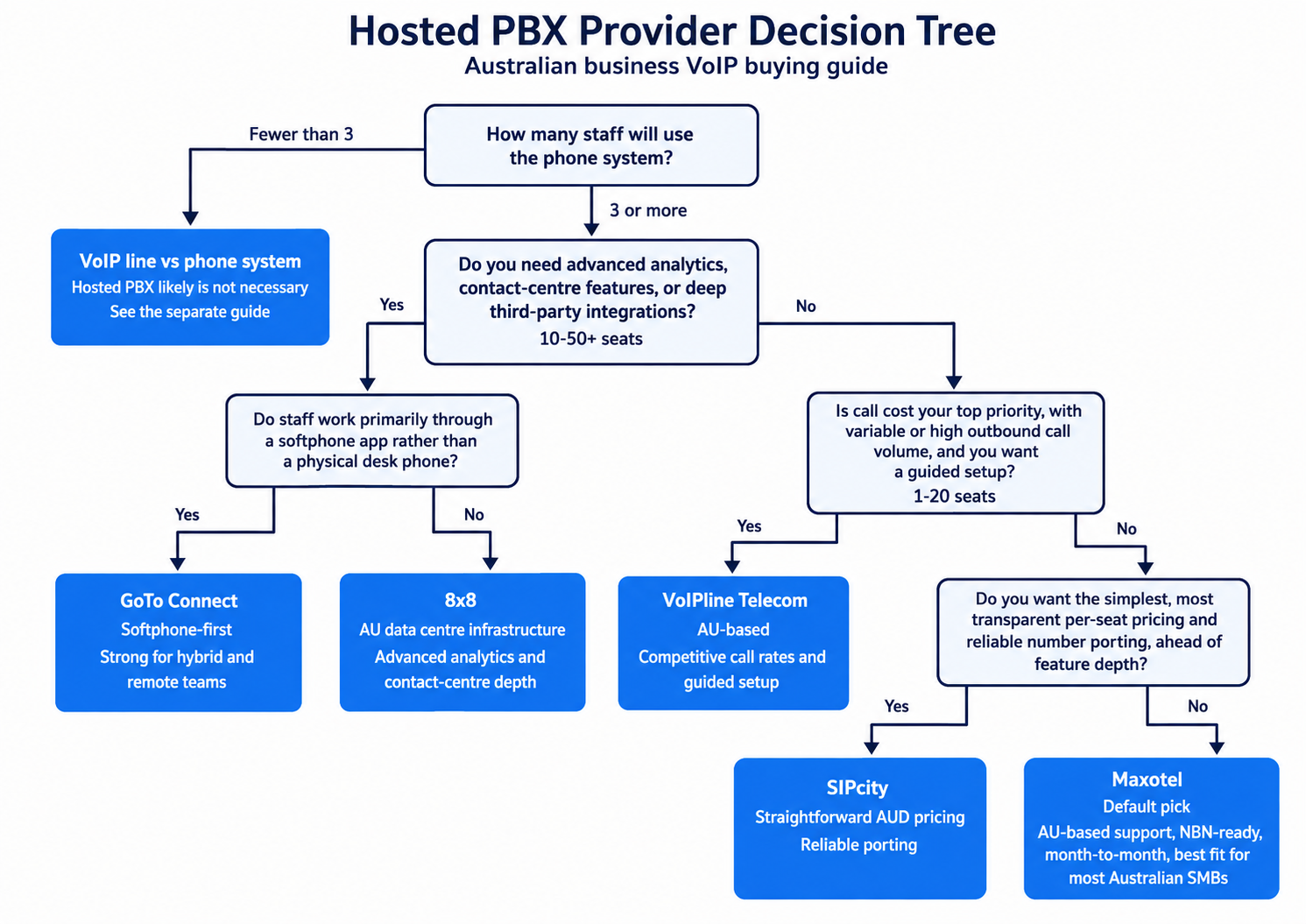
The right cloud phone system company depends on your business size, call volume, and AU-specific requirements (number porting quality, NBN codec support, AUD billing). Below is an overview of the main categories of providers in the Australian market and representative examples of each. This is not a ranked "best of" list , the right choice varies by situation. For a specific recommendation based on your business, use our Get a Recommendation service.
AU-Native Specialists: Built for the Australian Market
Maxotel is an AU-native cloud phone system company positioning specifically as an SMB specialist. Their model is consultative: they assess how your business works before recommending a plan, which makes them well-suited to businesses setting up a proper phone system for the first time. Current advertised pricing starts at $9.95 per user per month for PAYG service, with a minimum of two users, while the included-call Outright/BYO plan starts at $29.95 per user per month; prices include GST. Their Australian support team provides configuration assistance, automatic phone setup and number-porting support; fees and delivery arrangements should be compared with each alternative provider. Stronger for: 1-20 seat businesses that want someone to walk them through the whole setup. Less strong for: advanced analytics, large CRM integrations, enterprise call centre features.
VoIPline Telecom is an AU-based provider with competitive call rates and a strong focus on Australian SMBs. Their platform supports all AU geographic number types (02, 03, 07, 08), 1300 and 1800 numbers, and standard SIP desk phones from Yealink and Grandstream. Pricing is competitive at the lower end of the market, with per-minute call costs that suit businesses with variable outbound call volumes. Their support team operates in Australian time zones with NBN-aware troubleshooting. Stronger for: businesses prioritising call cost over feature depth. Less strong for: businesses needing deep third-party integrations or enterprise-tier analytics.
SIPcity is an AU-based cloud telephony provider offering cloud phone system with strong AU number support and a focus on straightforward pricing. SIPcity's plan inclusions vary: Flex uses pay-as-you-go calling with basic features, while higher plans add included calls and features such as auto-attendant. SIPcity publishes procedures and charges for number porting. They operate on AU infrastructure with local support. Stronger for: small-medium businesses wanting simple, transparent AUD pricing with reliable porting. Less strong for: businesses needing advanced contact centre features or complex IVR systems.
International Providers with AU Infrastructure
8x8 is a US-headquartered provider with AU data centre infrastructure and local support. Their platform is mature and full-featured: advanced analytics dashboards, call centre capabilities, video conferencing, and team messaging are all included at higher tiers. AU data centre options matter for call latency and for businesses with data residency requirements. Australian pricing is available by requesting a quote from 8x8. The onboarding process assumes self-service capability , a step up in technical complexity compared to AU-native specialists. Stronger for: 10-50 seat businesses that need analytics depth or contact centre features. Less strong for: 1-5 seat businesses that want a guided setup experience.
GoTo Connect (formerly Jive) is built for teams that want softphone-first operation , staff use an app on their computer or mobile as the primary device, with optional physical handset support. GoTo Connect’s Australian plan pricing is available by contacting sales. GoTo Connect advertises 24/7 support and local-number availability; confirm where the support team serving your account is based. Their platform handles remote and hybrid teams well: the mobile app is polished and includes presence, SMS, and video. Where GoTo Connect is weaker: businesses that want physical handsets as the primary device will find the ecosystem slightly less polished than AU-native SIP-focused providers.
AU-Native vs International: What the Difference Means in Practice
The choice between an AU-native provider and an international platform with AU presence comes down to four practical factors:
- Number porting speed and reliability. Number-porting arrangements vary by provider and may involve agents, carrier partners, or other portability-service suppliers, regardless of whether the provider is Australian or international. If you are porting an existing business number, ask each provider specifically: "Do you handle AU number porting in-house, or through a third party?"
- AUD billing and pricing clarity. AU-native providers price in AUD from the start, which removes currency risk and simplifies budgeting. International providers that publish pricing in USD introduce exchange rate exposure. Ask for a written AUD quote before committing.
- NBN-specific support knowledge. NBN-specific support capability varies by provider; ask each provider to demonstrate experience with NBN connection types, SIP ALG and call-quality troubleshooting.
- Feature depth vs simplicity. Feature depth varies by provider and plan; compare the specific analytics, contact-centre capabilities and integrations you require. If you need those features, the added complexity of an international platform is worth it. If you need a reliable phone system that just works, the consultative AU-native providers are often a faster path to go-live.
How to Run a Proper Trial Before Committing
Some cloud phone system companies offer a free trial or demo account. Use it properly rather than just testing "can I make a call." A proper trial for an Australian business should cover:
- Test inbound call quality from an external number , not just internal extensions. Call your trial number from a mobile and a landline. Listen for delay, echo, or drop-outs.
- If evening performance matters, also test during the ACCC’s 7-11 pm busy period. Performance may vary by service and provider, but worse evening call quality should not be assumed.Test number porting on a non-critical number first. If you have a secondary business number you can afford to have offline for a few days, port it first. This reveals the provider's porting process before you commit your main line.
- Test the mobile app from a 4G connection. If any staff will use the softphone app while away from the office, test it on mobile data, not just office WiFi.
- Test the auto-attendant setup process. How long does it take to configure an after-hours message and a basic ring group? If the configuration portal is confusing, that is a signal.
Common Mistakes Businesses Make When Choosing a Hosted PBX Provider
These are the mistakes that come up repeatedly when businesses have a bad experience with a cloud phone system company and are looking to switch.Mistake 1: Choosing on Price Alone Without Checking AU-Specific Capabilities
Low headline prices may exclude porting, 1300-number services, support or other charges. Check each provider's current Australian pricing, support hours, billing currency and porting process. Calculate any cost difference using an itemised quote for the same users, numbers, calling allowance, features and support. For a 5-seat team, that is $25-50 per month, which is worth paying for a provider that actually works in the Australian context.Mistake 2: Not Verifying 000 Emergency Calling Before Going Live
Providers supplying an emergency telephone service must meet Australia's emergency-call obligations. Because ACMA describes 000 as available from certain VoIP services, confirm access and any limitations for the specific service. Some providers configure this automatically at account creation. Others require you to register a service address before 000 calls are routed correctly. If your business goes live on a new cloud phone system without testing 000, and there is ever an emergency, the consequences of a misconfigured system are severe. Do not make a non-emergency test call to 000. Ask your provider to confirm emergency-call routing and verify or update the service-address details supplied to the IPND. Do not skip this step.Mistake 3: Signing a Long Contract Before Testing Call Quality on Your Actual Connection
Call quality on NBN varies significantly based on connection type (FTTP, FTTC, FTTB, HFC), ISP, and time of day. Performance can differ between premises because call quality depends on the broadband service, network load, local equipment and configuration; test on the actual connection. Good providers offer a trial period specifically so you can test call quality in your environment before committing. If a provider does not offer any trial or proof-of-concept period before requiring a 12-month contract, that is a risk worth taking seriously. At minimum, negotiate a performance clause that allows you to exit if call quality does not meet an agreed standard after a defined remediation period.Your Next Steps: Before You Commit to a Provider
Use this checklist before signing with any cloud phone system company. Completing these steps before committing significantly reduces the risk of a poor outcome.When evaluating cloud phone system companies through an MSP or IT provider, it is worth understanding where their recommendations come from and what information does not always make it into the conversation. Our guide on what your MSP is not telling you about your phone system covers the questions to ask and the business model dynamics that shape MSP advice.
Before diving into provider comparisons, confirm that a hosted PBX is actually what your business needs. If you have fewer than three staff or only one person answers calls, a basic VOIP line may be enough. See Do I Need a Phone System or Just a VOIP Line? for the quick decision check, or our full hosted PBX for small business guide for a deeper look at suitability and cost.
What is the typical cost of a cloud phone system company in Australia per user per month?
Can I keep my existing phone number when switching to a cloud phone system company?
Does a cloud phone system work on NBN?
What happens to my cloud phone system if the internet goes down?
Does cloud phone system support 000 emergency calls in Australia?
What is the difference between a cloud phone system and a cloud PBX?
How do I know if a cloud phone system company is legitimate and compliant in Australia?
Is month-to-month hosting PBX worth it compared to a 12-month contract?
Not sure which cloud phone system company is the right fit for your business? Describe your setup and requirements and we will match you with the most appropriate option in the Australian market.
Get a Free Recommendation