This guide covers phone system selection for Australian warehouse and logistics operations, specifically the two-zone communication challenge that generic VOIP guides ignore: a standard office environment (dispatch, admin, accounts) and a demanding floor environment (picking, packing, receiving, loading docks) that requires different hardware, different coverage planning, and different thinking. Need to Know Comms is an independent Australian business communications publishing project. The guidance here draws on real AU deployment constraints including NBN connection types at industrial sites, PSTN copper shutdown implications for legacy warehouse intercom systems, and the practical limits of consumer-grade hardware in a commercial environment. By the end of this guide, you will know which hardware belongs in which zone, what a business phone company must support before you commit, and the three mistakes that send warehouse managers back to square one.
The Office vs Floor Divide: Why One System, Two Hardware Zones
The starting point for any warehouse phone system decision is recognising that the building contains two fundamentally different communication environments. Getting this wrong at the planning stage is expensive.
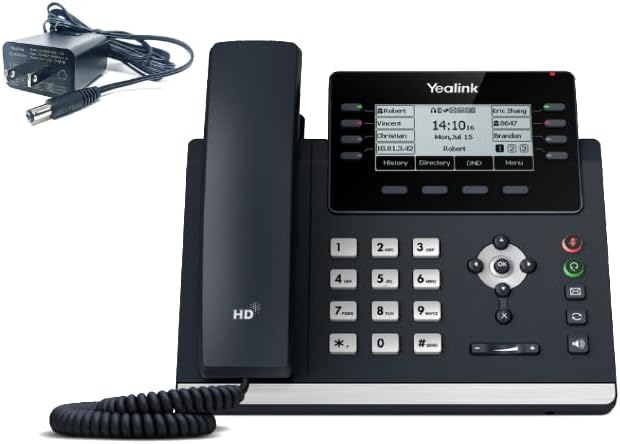
The office zone, dispatch desk, accounts, administration, site manager's office, looks like any other small business. Staff sit at desks. Calls are inbound and outbound. A standard SIP desk phone (Yealink T-series, Grandstream GXP-series) on a cloud phone system plan handles this environment well. The requirements are conventional: ring groups, voicemail-to-email, DDI numbers for key staff, IVR for inbound calls, and an after-hours routing rule for when the office closes.
The floor zone, picking aisles, packing stations, receiving bay, loading docks, is a different problem. Staff are on the move. Background noise (forklifts, conveyor belts, packing machines, ventilation) makes a desk phone functionally useless even if one were physically present. The floor may span 500 to 5,000 square metres or more. A single DECT base station covers roughly 50 metres indoors under good conditions. Staff need to be reachable, need to be able to reach the office, and in some operations need to receive paging announcements over overhead speakers.
The good news is that a single cloud phone system platform handles both zones. The system is the same, a cloud PBX with SIP extensions. What differs is the hardware attached to that system in each zone. This distinction is worth establishing early: you are not buying two separate phone systems; you are buying one platform with two hardware layers.
DECT Cordless Phones for Warehouse Floors
If your warehouse floor staff are currently relying on personal mobiles or shouting across the floor to communicate, that is a safety and efficiency problem with a direct cost. Missed instructions and communication breakdowns in logistics operations compound into delays and errors. Business IP-DECT handsets communicate through a compatible DECT IP base, which registers with a supported cloud PBX. Confirm base-and-handset compatibility, provider support, and current handset pricing before purchase.
The most common concern about warehouse phone systems is whether wireless phones will work reliably across a large floor with metal racking, forklifts, and high ceilings. DECT phones operate on a dedicated 1.8GHz frequency band that avoids interference from WiFi and Bluetooth. Multiple DECT base stations distribute across a large floor to ensure full coverage. Base-station count and placement must be determined from the site layout, obstructions, required cell overlap and an RF coverage survey or on-site testing.
DECT (Digital Enhanced Cordless Telecommunications) is the technology that makes wireless phones viable on a warehouse floor. It operates on a dedicated 1.8-1.9GHz frequency band that avoids the congestion of the 2.4GHz band shared by WiFi, Bluetooth, and countless other devices. DECT uses separate spectrum from 2.4 GHz Wi-Fi and Bluetooth, which can reduce co-channel contention. Actual latency, coverage and voice quality depend on the selected equipment, RF environment and deployment design.
A DECT base station in a warehouse building covers approximately 50 metres in each direction under typical conditions, less if there are concrete walls, racking systems with dense stock, or metal partitions. Floor area alone cannot determine whether one base station will provide full coverage; building shape, mounting position, racking, stock and other obstructions must be tested. Multi-cell DECT deployments use multiple base stations connected to a single system; handsets roam between cells as staff move through the building, just as a mobile phone hands off between towers. The handsets do not drop the call during the transition.
Key specifications to understand when evaluating DECT for a warehouse:
- Handsets per base station. Most business-grade base stations support 5-10 simultaneous calls and up to 10-30 registered handsets. For a floor with 15 pickers, you need a system that supports at least 15 registered handsets and enough simultaneous call capacity for your peak period.
- Multi-cell support. Not all base stations support multi-cell. Confirm before purchasing. Yealink W series (W90 hub for multi-cell), Spectralink, and Gigaset professional models all support multi-cell deployment. Consumer-grade DECT base stations typically do not.
- IP65 rating for ruggedised handsets. Standard DECT handsets are not rated for dusty or wet environments. A warehouse receiving bay, a cold store entrance, or an outdoor loading dock can damage unprotected electronics quickly. Select handset protection from the actual environmental risks. IP65 is appropriate where dust ingress and water jets are credible, while cold, impact or chemical exposure may require additional verified ratings. Gigaset and Spectralink both produce IP65-rated DECT handsets for industrial use. Yealink's W series includes ruggedised options.
Indicative pricing (AUD): A standard DECT base station runs $150-300. Ruggedised IP65-rated DECT handsets cost $200-400 each, depending on the model and supplier. A standard (non-ruggedised) DECT handset for a drier indoor environment costs $80-150. For a 10-handset floor deployment with two base stations and a mix of ruggedised and standard handsets, budget $2,000-4,500 for hardware alone.
For a detailed DECT system comparison across brands and use cases, see our best DECT cordless phones for business in Australia guide.
Paging and PA Integration: Calling the Floor from the System
Many warehouses already have a public address system, overhead speakers used for break announcements, loading dock calls, or all-staff notifications. Integrating this PA system with a cloud phone system platform is possible but requires specific hardware and provider support that is not universal.
The two common integration approaches are:
- SIP paging devices. Devices like the Algo 8180 or CyberData SIP speakers connect directly to your network and register as a SIP extension on your cloud phone system. To page the floor, a user dials the extension assigned to the paging device. The audio broadcasts through the connected speakers. This approach requires no analogue bridge, it is a pure IP integration, and it is the cleanest solution for a new deployment.
- ATA plus existing amplifier. Existing PA integration requires a compatible SIP paging adapter or, where the amplifier has a suitable telephone interface, an ATA plus any required paging-interface and control hardware. Confirm the electrical, signalling and PBX requirements before purchase. The ATA converts the SIP call to an analogue audio signal. This preserves existing speaker infrastructure while adding VOIP integration.
Critical check before purchasing any paging hardware: Not all cloud phone system companies support SIP paging extensions or multicast paging natively. Some providers restrict certain SIP behaviours or do not allow third-party devices to register as extensions. Confirm with your intended business phone company that they support SIP device registration for paging endpoints before committing to either approach. This question is non-negotiable, discovering the limitation after purchasing hardware is a costly mistake.
Paging integration is also relevant for logistics operations that need to reach all staff simultaneously, a truck arrival at the loading dock, a stock discrepancy requiring a count, an urgent pick job. A well-integrated paging system reduces the number of individual calls needed and speeds up floor response time.
Wired Desk Phones for Dispatch and Admin
The office zone of a warehouse does not require anything unusual. Standard SIP desk phones on a cloud phone system plan are the right choice. The considerations are the same as for any Australian small business office:
- Dispatch desk. The dispatch team handles carrier calls, supplier enquiries, customer delivery queries, and driver coordination. A mid-range desk phone with good audio quality (speakerphone, handsfree) and at least two SIP lines is appropriate. The Yealink T43U (approximately $150-200 AUD) or Grandstream GXP2135 ($130-180) cover this use case well.
- Administration and accounts. Standard entry-level desk phones suffice for staff who are primarily on inbound or outbound admin calls. The Yealink T31P ($80-110) or Grandstream GXP1630 ($90-130) are cost-effective choices.
- Site manager's office. A manager who handles sensitive conversations (HR, supplier negotiations, customer escalations) benefits from a higher-quality handset with a headset port and noise-cancelling capability. Budget $150-200 for this station.
All desk phones in the office zone connect via PoE (Power over Ethernet), a single Cat5e or Cat6 cable delivers both network connectivity and power to the phone. This eliminates the need for separate power adapters at each desk and simplifies cabling.
For guidance on choosing specific desk phone models, see our phone system for 10 employees guide which covers similar office-zone requirements in detail.
Softphones for Warehouse Managers
Warehouse managers and operations leads occupy a specific position that neither a desk phone nor a floor DECT handset serves perfectly. They move between the office and the floor regularly throughout the day. They need to receive calls on their business number regardless of where they are.
A softphone, a VOIP app installed on a mobile phone or tablet, addresses this directly. The softphone registers as a SIP extension on the same cloud phone system as the desk phones and DECT handsets. Calls to the manager's DDI ring the softphone wherever they are. They can transfer calls to floor staff on their DECT handsets, conference in the dispatch desk, or step outside to take a call without losing the business number.
Softphone availability and charging vary by provider and plan; confirm whether the mobile app, user licence and required calling features are included. The app requires a data connection (WiFi or mobile data) to function. In a warehouse environment, WiFi coverage varies, if the manager's softphone drops calls when moving between the office and the floor, the issue is WiFi dead zones rather than the VOIP platform. This is relevant to the network infrastructure discussion below.
Softphones for managers are a complement to hardware, not a replacement for it. For mission-critical floor calls or paging functions, hardware-based DECT remains more reliable.
Inbound Logistics Lines: DDI Numbers for Carriers, Suppliers and Customers
A warehouse operation typically has multiple inbound call audiences that benefit from separate numbers: carriers and freight companies, suppliers and procurement contacts, customers chasing delivery status, and internal calls from remote sites or drivers. On a traditional phone system, each of these would require a separate physical line at $20-30 per month each.
Additional DDI pricing varies by provider and plan; numbers may be bundled or charged separately, so compare current itemised quotes. This makes it practical to assign dedicated numbers to different inbound purposes without a significant cost increase:
- A dedicated number for carrier and freight company calls, routed directly to the dispatch team's ring group.
- A separate number for supplier and procurement calls, routed to the purchasing manager's extension or a voicemail queue outside business hours.
- A main customer-facing number with IVR routing for delivery enquiries.
- If the site has a security monitoring arrangement, a separate number can be routed directly to the on-call mobile after hours.
The practical benefit of separate numbers is cleaner call routing and better caller experience. A carrier calling about a delivery in progress does not need to navigate an IVR designed for customers. Routing by inbound number makes this separation automatic.
After-Hours Security Routing
Warehouses and logistics facilities often operate with security coverage after hours, either an on-site security guard or a remote monitoring service. Inbound calls to the site outside business hours need to reach the right person. A missed call about a triggered alarm, a delivery driver at the gate, or a vehicle breakdown on a night run can escalate quickly.
Time-based routing on a cloud phone system platform handles this cleanly. Outside the configured business hours window, inbound calls to the main site number route to the security guard's mobile, the monitoring service's line, or both in sequence. The routing can be adjusted from the business phone company's portal without any on-site IT work, useful when security arrangements change or when a public holiday requires a different coverage setup.
For sites with a security monitoring service rather than a physical guard, the VOIP platform can be configured to forward after-hours calls to the monitoring service's SIP number or a standard geographic/1300 number, depending on the service's capabilities.
Network Infrastructure: Wired PoE vs WiFi for Warehouse VOIP
VOIP runs over the data network. The quality and reliability of calls depends on the quality and reliability of that network. In a warehouse environment, this deserves more attention than it gets in a standard office deployment.
Wired PoE (Power over Ethernet) is the right choice for fixed endpoints. Desk phones in the office zone, DECT base stations on the warehouse floor, and SIP paging devices should all connect via Cat5e or Cat6 Ethernet cables to PoE-capable network switches. Wired connections are deterministic, the switch controls priority, there is no interference, and the connection does not fluctuate based on what other devices are doing. For critical calls (a dispatch desk handling a delivery complication, a manager escalation call, a paging announcement), wired is more reliable than wireless.
WiFi VoIP introduces real-world complications. A softphone on a mobile device or a WiFi-connected SIP phone depends on consistent WiFi coverage and signal quality across the building. Warehouse environments are challenging for WiFi: large open spaces, metal racking, frequent movement of stock, industrial machinery, and forklifts all create interference and coverage gaps. A manager's softphone may work perfectly in the office and drop calls in the middle of the loading dock. If you are planning to rely on WiFi VOIP for floor coverage, invest in a proper wireless site survey before selecting your hardware.
DECT base stations themselves connect via wired Ethernet. The DECT radio handles the wireless link between base station and handset; the base station is a wired device. This is an important distinction: DECT cordless phones are more reliable than WiFi VoIP phones in a warehouse environment because only the final handset-to-base link is wireless, and DECT is engineered for exactly this use case.
For a new warehouse deployment or a major renovation, install Cat6 cabling to every planned phone location and potential DECT base station position during the fit-out. Retro-fit cabling in a live warehouse is significantly more expensive.
Australian Warehouses: What You Need to Know Before You Deploy
The Australian deployment context introduces several factors that general VOIP guides do not address.
NBN Connection Types at Industrial Sites
Warehouses and logistics facilities in Australian industrial estates often have a different NBN availability profile from suburban offices. Common scenarios:
- FTTB (Fibre to the Building). Industrial estates built or upgraded since the NBN rollout may have FTTB connections. These are generally good for VOIP, consistent upload speeds, low jitter. Confirm available upload speeds with your NBN provider before selecting a phone system plan.
- FTTN (Fibre to the Node). Older industrial areas may be served by FTTN, where the copper run from the street cabinet to the building determines quality. A long or degraded copper run can reduce FTTN performance. Suitability for VoIP depends on measured upload capacity under load, concurrent-call bandwidth, jitter, packet loss and QoS rather than a 10 Mbps threshold alone.
- Business fibre (non-NBN). Some industrial estates, particularly larger commercial parks, have access to direct business fibre from carriers like Telstra, Vocus, or TPG. Business fibre is separate from the NBN and typically provides symmetric speeds with an SLA (Service Level Agreement) on uptime and quality. If your site has this option, it is worth the premium cost for a VOIP deployment, particularly if the operation runs 24 hours or handles high-value freight where communication failures have significant commercial consequences.
- Fixed wireless NBN. Some regional or outer-suburban industrial sites are on fixed wireless NBN. Fixed wireless introduces higher latency and variable speeds compared to fixed line connections. It can support VOIP, but call quality is more variable. Test call quality under peak load and size the deployment from measured latency, jitter, packet loss and available bandwidth rather than a fixed concurrent-call threshold.
Regardless of connection type, deploy a UPS on your NBN equipment. A power interruption on a site where active deliveries are being coordinated or trucks are waiting at the dock creates immediate operational problems. See our guide on setting up business phones on NBN for connection testing and QoS configuration guidance.
PSTN Copper Shutdown and Legacy Warehouse Intercom Systems
Older warehouse and logistics facilities sometimes have intercom or PA systems that were integrated with analogue copper phone lines. Entry intercoms, loading dock call panels, and older paging amplifiers may have been connected to the PSTN or to an analogue key system that ran over copper.
Most copper services in NBN fixed-line areas have been or will be disconnected, but this is not universal. Fixed Wireless, Sky Muster, business and Special Services can have different arrangements, so check every legacy line and address with the service provider.
The practical implication: any intercom or paging component that connected via copper needs to be assessed. If the device has an analogue audio input, it can potentially be integrated into a VOIP platform using an ATA (as described in the paging section above). If the device is a proprietary system that relied on the copper line for signalling as well as audio, it will need replacement.
Australian Consumer Law on Telco Contracts
ACL consumer guarantees may cover a business telco purchase when the business meets the ACL definition of a consumer, including where the amount paid or payable does not exceed $100,000 or the service is ordinarily acquired for personal, domestic or household use. Eligibility and remedies depend on the contract and circumstances. The relevant protections for a warehouse operator signing a VOIP contract include:
- Service guarantees. If a provider cannot deliver the service quality described in their plan documentation, you have rights under ACL's consumer guarantees framework. Document call quality issues, date-stamp them, and raise a formal complaint with the provider before escalating to the TIO (Telecommunications Industry Ombudsman).
- Early termination fees. Many business phone companies offer month-to-month plans with no lock-in. Some offer discounted rates on 12 or 24-month contracts. Read the cancellation terms before signing, particularly for larger deployments with multiple handset rental agreements, where exit costs can be significant.
- Equipment ownership. If the provider supplies handsets as part the plan, confirm ownership on contract expiry or cancellation. Rented handsets returned to the provider at contract end means your staff are without hardware on day one of a new provider. Owned or purchased handsets give you portability.
What Most Warehouse Operators Get Wrong About Their Phone System
Three mistakes come up repeatedly in warehouse and logistics phone system deployments. Each is avoidable with planning.
Mistake 1: Buying Walkie-Talkies Instead of DECT
Australian-compliant UHF CB walkie-talkies are a different product for a different purpose. They handle push-to-talk broadcasts across a channel. They cannot transfer calls, do not have voicemail, cannot integrate with a phone system, and cannot receive inbound calls from outside the site. A driver calling to confirm a delivery cannot reach the warehouse team via a walkie-talkie.
DECT handsets on a cloud phone system system can do everything a walkie-talkie does not: receive and place calls like a desk phone, transfer calls between extensions, integrate with the PA paging system, and receive calls from outside the building. Group paging and intercom capability is platform- and handset-dependent; confirm the required behavior with the selected provider and DECT system.
Walkie-talkies are appropriate for shift supervisors who need constant floor radio communication in large distribution centres. They are not a substitute for a business phone system. Buy DECT for the phone system and, if needed, add a separate push-to-talk radio layer for floor coordination, do not conflate the two.
Mistake 2: Assuming One DECT Base Station Covers a 2,000sqm Floor
A single DECT base station is typically rated for 50m range indoors. In practice, in a warehouse with metal racking, concrete columns, and industrial equipment, reliable coverage may be 30-40m from the base station. A 2,000sqm floor at 40m x 50m requires coverage planning, not assumptions.
The correct approach is to map the floor, identify the areas where handsets will be used (picking zones, packing area, receiving bay, loading dock), and determine how many base stations are needed to cover those areas with adequate signal overlap. Set the base-station budget after mapping the site and validating coverage, overlap and synchronization requirements through an RF survey or staged on-site testing. Multi-cell DECT systems (Yealink W90, Spectralink) make this straightforward, add base stations until coverage is complete, and handsets roam transparently between them.
Deploy one base station, test coverage with a handset in hand, and mark the point where call quality degrades. Add the next base station before that point. This is more reliable than any theoretical coverage estimate.
Mistake 3: Purchasing Paging Hardware Before Confirming Provider Support
SIP paging devices and ATA-based PA integrations require specific features from your business phone company: the ability to register a third-party SIP device as an extension, and in some cases support for multicast paging (where one call reaches multiple paging devices simultaneously). Not all cloud phone system companies support this. Some providers use proprietary device provisioning that restricts which hardware can register on the platform.
The mistake is purchasing the paging hardware, a SIP speaker system, an ATA, a new PA amplifier, before confirming that your chosen business phone company supports the integration. Discovering this limitation after hardware purchase typically means either returning equipment (if within the return window) or changing business phone companies, neither of which is free. Ask the provider directly: 'Does your platform support third-party SIP device registration? Can I register a SIP paging endpoint as an extension?' Get the answer in writing or in a support ticket before purchasing.
Your Next Steps
A practical checklist for deploying or upgrading a phone system at an Australian warehouse or logistics site:
- Map the two zones. Document every location that needs phone or paging coverage: office desks, dispatch station, floor picking zones, packing area, receiving bay, loading dock, security booth. Note whether each location is indoors, outdoors, or in a dusty or wet environment.
- Assess your NBN connection. Check your connection type (FTTP, FTTB, FTTN, HFC, fixed wireless) and confirm your upload speed during business hours. Required upload headroom depends on codec, packetisation, encryption or VPN overhead, QoS and concurrent non-voice traffic. Calculate it from the provider's per-call requirement and add an appropriate operating margin. Test at peak time, not off-peak.
- Identify DECT coverage requirements. For each floor zone, estimate the distance from a potential base station position to the furthest point staff will use a handset. If any zone is beyond 40m from a single base, plan for multi-cell DECT from the start.
- Specify IP65-rated handsets for wet and dusty environments. Receiving bays, cool stores, outdoor loading areas, and dusty picking environments need ruggedised handsets rated IP65 or higher. Do not cut costs here, standard handsets fail quickly in these conditions.
- Confirm paging support with your business phone company before purchasing hardware. If the site needs PA integration, contact your shortlisted providers and ask explicitly about third-party SIP device registration and multicast paging support. Document the response.
- Plan your inbound DDI structure. Decide which inbound call audiences (carriers, suppliers, customers, security) benefit from separate numbers. Additional DDI pricing varies by provider and plan and may be bundled or charged separately; compare current itemised quotes.
- Configure after-hours routing before go-live. Set up time-based routing rules that reflect your actual security and on-call arrangements before the system goes live. Discovering that after-hours calls go nowhere on the first day of operation is avoidable.
- Audit legacy intercom and PA hardware. Check whether any existing site intercom, entry panel, or PA amplifier relied on copper analogue lines. If so, assess whether ATA integration is feasible or whether replacement is needed.
- Install wired PoE cabling to all fixed phone and base station positions. If the building is being fitted out or renovated, run Cat6 to every planned location now. Retro-fit cabling in a live warehouse operation is significantly more disruptive and expensive.
If you would like a recommendation on the right business phone company and DECT hardware configuration for your warehouse's specific layout and operational requirements, get a free recommendation here.
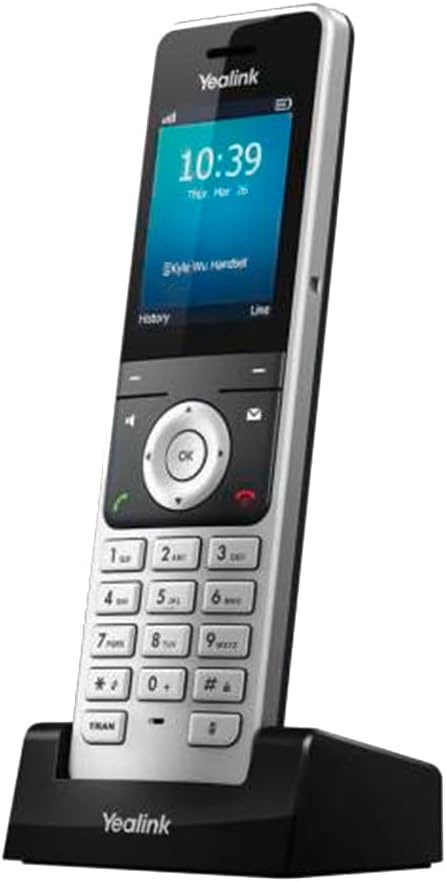
For mobile workers in warehouse environments, a DECT cordless system is the right hardware choice, staff carry the handset throughout the site and calls route to them exactly like a desk phone. The Yealink W76P is the standard AU recommendation. See our full Yealink W76P DECT review for Australia covering range, handset battery life, and how to register it with a cloud phone system.
Warehouses and logistics sites share the same underlying platform requirements as any multi-user Australian business. Our guide to the best VOIP phone system for small business in Australia covers the cloud phone system platforms used across Australian SMBs, including which ones support DECT cordless handsets and paging integration for floor environments.
Warehouse operators still on a legacy PABX or Telstra copper service are often surprised by how straightforward a VOIP migration is when it is planned correctly. Our guide to VOIP vs traditional phone in Australia compares both options on cost, reliability, and the features that warehouse and logistics environments depend on, including paging, ring groups, and failover.
What Does a Phone System Cost for a Warehouse?
Warehouse cloud-phone pricing varies materially by provider, included calls and whether licences are charged per user, extension, device or concurrent call. Obtain an itemised quote for the required users, devices, numbers and call capacity. Ruggedised DECT handset pricing varies materially by model, protection rating and supplier; obtain current Australian pricing for the exact compatible handset. Wireless headsets for order-picking staff run $50-150. Ongoing charges depend on the provider's licensing model; additional physical handsets may require extra device, extension, user or concurrent-call licences.
What type of phone system does a warehouse or logistics operation need in Australia?
A cloud phone system (cloud PBX) platform is the right base for most Australian warehouse and logistics operations. It handles the office zone (desk phones for dispatch, admin, management) and the floor zone (DECT cordless handsets for mobile staff) from a single system. Feature availability and charging vary by provider and plan. Confirm DDI pricing, time-based routing, third-party SIP paging registration and multicast support before committing. The key is selecting the right hardware for each zone and confirming that the business phone company supports the integrations you need (particularly SIP paging) before committing.
How many DECT base stations does a warehouse floor need?
One DECT base station covers approximately 50m indoors under good conditions, and closer to 30-40m in a warehouse with metal racking, concrete columns, or industrial equipment. Base-station count cannot be determined from floor area alone; map the layout and verify coverage, obstructions and required overlap through an RF survey or on-site testing. The correct approach is to deploy a base station, test coverage at the intended handset locations, and add another base station before the point where signal degrades. Multi-cell DECT systems provide seamless roaming but have finite, model- and licence-specific expansion limits; confirm the required capacity against the selected system's current documentation. Do not assume a single base covers your whole floor.
Can a VOIP system integrate with existing warehouse PA speakers?
Yes, in most cases. Existing PA integration requires an interface compatible with the amplifier's exact input and control requirements, often a purpose-built SIP paging adapter or an ATA plus additional paging-interface hardware. Alternatively, SIP paging devices (such as Algo 8180 speakers) connect directly to the network and register as SIP extensions, a user dials the paging extension and audio broadcasts through the connected speakers. The critical step before purchasing any paging hardware is confirming with your business phone company that they support third-party SIP device registration and, if needed, multicast paging. Not all providers support this. Ask before buying.
What is the difference between DECT phones and walkie-talkies for a warehouse?
DECT phones and walkie-talkies serve different purposes. DECT handsets on a cloud phone system system function as full business phone extensions, they receive and place calls, transfer calls between team members, integrate with the PA system, and can be reached from outside the building. Walkie-talkies (UHF push-to-talk radios) are good for instant group broadcasts on the floor but cannot handle inbound calls from drivers, suppliers, or customers. A warehouse phone system needs DECT for business telephony. Walkie-talkies are a separate tool for shift coordination if needed, they do not replace a phone system.
What handsets should be used in dusty or wet warehouse areas?
Any handset deployed in a dusty picking environment, a receiving bay with outdoor exposure, a cool store entrance, or near washing-down equipment should be rated IP65 or higher. IP65 means dust-tight and protected against low-pressure water jets. Standard consumer or office-grade DECT handsets are not IP65 rated and can fail quickly in these conditions. Ruggedised IP65 DECT handsets from Gigaset (the Gigaset R700H PRO and other verified IP65-rated models), Spectralink, and Yealink's ruggedised W-series cost $200-400 AUD each but are the correct specification. Using standard handsets to save money in harsh environments is a false economy.
How much does a phone system for an Australian warehouse cost?
Indicative AUD costs for a warehouse VOIP deployment: SIP desk phones for the office zone $80-200 each; DECT base station $150-300 each; standard DECT handsets $80-150 each; ruggedised IP65 DECT handsets $200-400 each; cloud phone system plan $15-35 per user per month; additional DDI pricing varies by provider and plan and may be bundled or charged separately. Costs for this configuration depend on the selected handsets, base system, paging and installation requirements, licensing structure and concurrent-call capacity; obtain itemised hardware and service quotes. Larger operations with more handsets, multi-cell DECT, and paging integration will cost more. Get specific quotes once your zone map and handset count are defined.
Does a warehouse VOIP system work on NBN?
Yes, but NBN connection type and quality at industrial sites varies more than at suburban offices. FTTB and business fibre connections are well-suited to VOIP. FTTN upload performance can vary; confirm measured peak-time upload capacity, latency, jitter and packet loss, then size concurrent calls using the provider's codec and bandwidth requirements. Fixed wireless NBN is adequate for small deployments but introduces higher latency and variable speeds. For operations where call quality directly affects logistics outcomes, a business fibre connection with an SLA is worth the additional monthly cost. See our guide to setting up business phones on NBN for connection testing and QoS guidance.
Can a warehouse run its office and floor communications from the same business phone company?
Yes, and that is the recommended approach. A single cloud phone system platform manages both the office zone (desk phones, softphones) and the floor zone (DECT handsets, paging integration) under one account. All extensions share the same dial plan, call transfer capability, and ring group configuration. Managing two separate phone systems, one for the office and one for the floor, creates unnecessary complexity and cost. The hardware differs between zones, but the platform is unified. This also simplifies billing, support contacts, and number management.
How are multi-site warehouse operations handled?
A cloud phone system platform is well-suited to multi-site logistics operations. Staff at different sites can call each other using internal extension numbers at no additional call cost. Inbound calls to any site number can be answered from any site if a staff member is covering across locations. Ring groups can span sites, a call to the main logistics number can ring the dispatch team at both the Sydney and Melbourne warehouses simultaneously. See our VOIP for multi-site business guide for detailed configuration guidance on cross-site dial plans and number management.
Not sure which business phone company supports DECT multi-cell, SIP paging, and the DDI structure your logistics operation needs? Tell us about your site and we will match you with the right setup.
Get a RecommendationNot sure whether DECT phones will work in your specific warehouse layout, or which cloud phone system platform supports DECT? Tell us your site size and layout and we'll give you a specific hardware recommendation and coverage plan. We reply personally, usually within one business day.
Every business is different. Tell us your current setup and what you are trying to achieve. We reply personally, usually within one business day.
Ask a Question