Twenty employees is the inflection point where a basic ISP phone plan breaks. Below 10 staff, a simple cloud phone system line or two handles most businesses fine. Above 20, you are dealing with departments, shift handovers, and enough simultaneous calls that a misconfigured system costs real money in missed leads. At exactly 20 employees, you are at the boundary. The features that were optional at 10 are now load-bearing. Ring groups stop being nice-to-have and become essential. An IVR auto-attendant stops being a professionalism upgrade and starts being the difference between calls reaching the right person and callers hanging up. This guide covers what a 20-person Australian business actually needs, what it costs in 2026, and common mistakes businesses should consider at this size.
Quick Cost Summary
For a 20-employee Australian business on cloud phone system VOIP in 2026, expect to pay:
- Phone-system pricing varies materially by provider, call bundle, licence model, features, devices, support level and GST treatment. Obtain like-for-like quotes showing every recurring charge.Hardware (IP desk phones): $79 to $399 per handset depending on model. The number of desk and conference phones should be based on roles, attendance patterns, hot-desking and meeting-room requirements rather than employee count alone.
- Setup: $0 to $500 depending on provider. Many Australian cloud phone system companies include remote configuration.
- Number-porting fees vary by provider, number type and port complexity; complex and 13/1300/1800 ports can cost more than $50, and additional rejection or rescheduling fees may apply.Calculate first-year cost from the selected plan, actual device mix, accessories, setup, porting, freight and GST; the component ranges stated here can produce totals above $16,000. Ongoing: $600 to $1,100/month.
Why 20 Employees Does Not Mean 20 Phone Lines
The most expensive mistake at this business size is buying one phone line per employee. It sounds logical. 20 staff, 20 lines. But it misunderstands how business calls actually work.
At any given moment, even in a busy office, only a fraction of staff are on live calls simultaneously. Peak concurrent-call demand must be estimated from busy-hour call data, average call duration and the acceptable probability of blocking. That accounts for inbound calls to reception, active outbound calls, calls on hold, and transfers in progress. Paying for 20 concurrent channels means paying double or triple your actual requirement.
Licensing and concurrency models vary by provider: some separate users from shared concurrent-call capacity, some include a line per user, and others use different concurrency models. Confirm the provider’s model and size capacity from call data. Monitor your call reports in the first month. If you hit the limit regularly, add channels. If you never hit it, remove some.
Sizing Your System: A Worked Example
Consider a 20-person professional services business: 3 reception/admin staff, 12 consultants or field staff, 3 managers, 2 support staff. Not everyone is in the office at the same time. Consultants are often out on-site. Managers travel. A realistic call model looks like this:
- Reception handling inbound: 2 to 3 channels
- Active consultant calls at peak: 3 to 4 channels
- Outbound sales or support calls: 2 channels
- Calls on hold or in transfer: 1 to 2 channels
Total peak: 8 to 11 concurrent channels. Validate the required pool and burst capacity against measured busy-hour traffic and the target blocking probability. Concurrent-call pricing varies by provider and may be bundled per user, priced by tier, charged per channel or offered without a channel fee. For no practical benefit.
cloud phone system vs On-Premise: Which Makes Sense at 20 Employees?
For 20 employees in 2026, cloud phone system wins in almost every scenario. Suitability depends on the organisation’s actual regulatory, privacy, security, resilience and contractual requirements; industry sector alone does not establish a need for an on-premises PBX. or businesses with extremely high call volumes where per-minute costs at scale justify on-premise investment.
cloud phone system vs On-Premise at 20 Employees
cloud phone system On-Premise PBX Upfront cost $0 to $500 $3,000 to $15,000+ Monthly cost Varies by licences, trunks, numbers, call usage and support, get a like-for-like quote Maintenance only; add trunks/channels, numbers, call usage, licences and support for a full comparison IT expertise required None. Provider manages Yes. Ongoing admin Scalability Add users in minutes Hardware procurement required Remote/mobile workers Native softphone support VPN or additional config Disaster recovery Built-in. Cloud redundancy Requires separate plan NBN dependency Yes, needs working connectivity between endpoints and the cloud service Depends on design, external-call dependency comes from its trunks and failover arrangements, internal calling can remain local Right for 20 employees? Yes. For almost all businesses Only with specific compliance needs On-premise PBX made financial sense when call costs were significant. When every minute of PSTN time had a metered cost and an on-site system could arbitrage that. Australian providers offer both metered and unlimited call plans, so call usage and fair-use terms remain relevant to total cost. The capital cost of on-premise hardware, plus the IT overhead of maintaining it, plus the upgrade cycle cost, rarely pays back at 20 employees. See our full comparison guide on cloud vs office phone systems in Australia for a detailed TCO breakdown.
The Right Hardware Mix for a 20-Person Office
Not every employee needs a desk phone. At 20 employees, hardware decisions should follow role, not headcount. The goal is to match the right device to the right role. Not to standardise everyone on the same handset.
Reception and Front Desk
Reception staff handling inbound call volume need a mid-range to high-end desk phone with multiple line keys. Enough to see and manage several calls simultaneously. The Yealink T46U (10 line keys, colour display) or T54W (10 line keys, colour display) are well-suited. Reception staff also benefit from a headset for hands-free operation during high-volume periods. At 20 employees with 2 to 3 reception staff, budget $250 to $400 per handset for reception positions. See our Yealink T46U review and Yealink T54W review for full specs.
 Yealink T54W IP PhoneView on Amazon AU ↗
Office-Based Staff
Consultants, account managers, and office-based staff who take and make regular calls but do not manage call queues are well-served by a mid-range handset. The Yealink T33G (4 line keys, colour display, under $130) covers most use cases. For staff who handle transfers or need to monitor team call status, step up to the T43U or T46U. Budget $130 to $260 per handset for standard office positions.
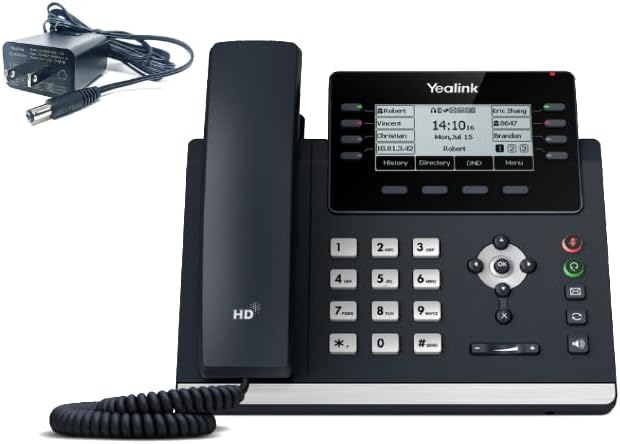 Yealink T43U IP PhoneView on Amazon AU ↗
Mobile and Remote Workers
Field staff, remote workers, or staff who split time between sites do not need a desk phone. They need a softphone. An app on their mobile or laptop that connects to the same cloud phone system system. Softphone licensing varies by provider and plan; confirm whether mobile and desktop apps, device licences and support are included. Remote staff can make and receive calls on their business number from anywhere with a data connection. No hardware purchase required for these roles.
Meeting Rooms
A 20-person business typically has one to two meeting rooms that need a conference phone. The Yealink CP925 (360-degree microphone, connects via USB or SIP, under $540) is the leading AU option for small to medium meeting rooms. For larger boardrooms, the CP965 is worth considering. Budget one conference phone per meeting room. $300 to $600 per unit.
 Yealink CP925 Conference PhoneView on Amazon AU ↗
DECT Cordless Phones (Where Relevant)
Warehouse, workshop, or reception environments where staff move around benefit from DECT cordless handsets rather than desk phones. The Yealink W76P base station (supports up to 10 handsets, under $200) is the standard AU choice for VOIP DECT at this scale. If your 20-person business has a floor that is not desk-based, factor in DECT units rather than forcing desk phones into an environment they are not suited for. See our Yealink W76P review.
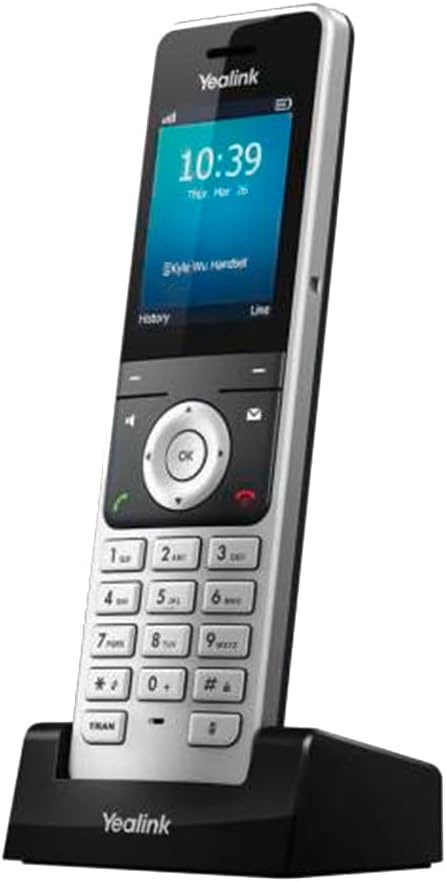 Yealink W76P DECT SystemView on Amazon AU ↗
Recommended Hardware Mix (20 Employees)
Recommended Hardware by Role. 20-Person Office
Typical quantity Recommended model Approx. cost each Reception/front desk (2-3 staff) 2-3 units Yealink T46U or T54W $259-$279 Office staff (8-12 staff) 8-12 units Yealink T33G or T43U $129-$199 Remote/mobile workers (3-5 staff) 0 Softphone app (included in plan) $0 Meeting room conference phone 1-2 units Yealink CP925 ~$539 DECT base (if warehouse/mobile floor) 0-1 unit Yealink W76P ~$199 Features That Become Essential at 20 Employees
The features that were optional at 5 or 10 employees become load-bearing at 20. Here is the distinction:
Must-Have Features
Ring groups (hunt groups): When a customer calls, the call needs to ring multiple staff simultaneously or in sequence. Not just one person. At 20 employees with 2 to 3 reception staff, if one is on a call, the second should ring automatically. Ring groups handle this. Without them, you are back to a single-line phone system regardless of what else your plan includes.
IVR / auto-attendant: A 20-person business typically has distinct departments or teams. Sales, support, accounts, operations. Callers need to reach the right team without going through a receptionist for every call. An IVR menu ("Press 1 for sales, press 2 for support") routes calls correctly and reduces receptionist load. This was optional at 5 employees. At 20 it is essential.
Call queuing: When all agents in a ring group are busy, calls need to queue with hold music rather than receiving a busy signal. A missed call at a 20-person business is a missed revenue opportunity. Basic call queuing is included in most cloud phone system plans.
Voicemail to email: At 20 employees, calls are coming in across multiple extensions and ring groups. Voicemail messages need to reach the right person's inbox, not sit on a shared device that nobody checks. Voicemail-to-email capabilities vary by provider; confirm whether the plan sends audio, transcription or both, and whether usage or storage charges apply.
After-hours call routing: Your system needs to behave differently outside business hours. Divert to voicemail, play an after-hours message, or forward to an emergency mobile. At 20 employees, after-hours call handling is a standard business requirement, not a premium feature.
Nice-to-Have Features
Call recording: Valuable for compliance (financial services, legal, healthcare), training, and dispute resolution. Usually available as an add-on. Before enabling call recording, obtain advice on the consent, notice, privacy, security, access and retention obligations that apply to your jurisdiction and regulated activities.
Call analytics and reporting: At 20 employees you have enough call volume for reports to be meaningful. Peak hour analysis, missed call rate, average handle time, agent performance. Most cloud phone system plans include a basic reporting dashboard. Use it in the first 60 days to validate your channel and ring group configuration.
CRM integration: If your team uses Salesforce, HubSpot, Zoho, or a similar CRM, a VOIP integration that logs calls automatically and surfaces contact records on inbound calls saves real time. Available from most cloud phone system companies as an add-on or through API integration.
Number porting: If your business has existing numbers (local DID, 1300, or 1800), port them to your new system. You keep the numbers your customers already know. Most Australian cloud phone system companies handle porting at no charge or for a small one-off fee. See our full guide to number porting in Australia.
Features You Do Not Need Yet
SIP trunking: SIP trunks connect an on-premise PBX to the PSTN. If you are on cloud phone system (which we recommend for 20 employees), SIP trunking is not relevant. Your provider handles the carrier connection.
Contact centre features: Skills-based routing, agent wallboards, supervisor monitoring, and workforce management tools are designed for contact centres. Contact-centre products have provider-specific minimums and can serve small teams; assess need from workflows such as skills routing, omnichannel handling, supervision, quality management and workforce management. You need a well-configured cloud phone system. Adding contact centre complexity at this size creates cost and overhead without proportionate benefit.
Microsoft Teams Phone / UCaaS: Teams Phone integrates calling into your Microsoft 365 environment. At 20 employees it works, but adds per-user licensing cost (Microsoft currently lists Teams Phone Standard at AU$15 per user/month ex GST on annual billing; PSTN service must be added through a Microsoft Calling Plan, Operator Connect, Direct Routing or Teams Phone Mobile. Microsoft does not list a “Teams Phone Premium” plan.). If your team already lives in Teams and you want calling integrated, evaluate it. If you are not already a heavy Teams user, a standalone cloud phone system is simpler and cheaper. See our Teams Phone guide for a full cost comparison.
Monthly Cost Breakdown: What You Should Actually Pay
The following is a realistic cost model for a 20-person Australian business on cloud phone system in 2026. Treat the following as an illustrative model unless each tier is mapped to a dated provider plan with its GST basis, call inclusions, feature limits and support hours identified.
Monthly Cost Breakdown. 20 Employees, cloud phone system
Budget option (~$30/user) Mid-range (~$45/user) Full-featured (~$55/user) Monthly plan cost (20 users) $600/month $900/month $1,100/month Calls included Local + national unlimited Local + national + mobile unlimited All calls unlimited Ring groups / IVR Included Included Included Voicemail to email Included Included Included Call recording Add-on Included Included CRM integration Not included Add-on Included Softphone app Included Included Included AU-based support Business hours Business hours 24/7 For most 20-person Australian businesses, the mid-range plan ($45/user/month, ~$900/month total) is the right choice. It covers unlimited calls including mobile. Which matters when staff are calling clients' mobiles regularly. And includes the features that matter most at this size. Lower-priced plans vary: compare mobile-call allowances, call recording, PBX features, fair-use terms and add-on charges plan by plan. The full-featured tier is worth it only if you have 24/7 support requirements or heavy CRM integration needs.
Want a specific recommendation for your 20-person business? Tell us your setup and we will come back with the right system, provider, and hardware. No obligation.
Get a RecommendationNBN Connection Requirements
Bandwidth per call depends on codec, packetisation, encryption and network overhead. Obtain the provider’s planning figure and allow capacity in both upload and download directions. On a standard NBN 50 or NBN 100 connection, this is well within capacity. VOIP bandwidth is a small fraction of your total connection.
The real NBN issue at 20 employees is not raw speed. It is contention and Quality of Service (QoS). If your internet connection is heavily loaded with large file transfers, video conferencing, or cloud backup during business hours, VOIP call quality can degrade. The fix is QoS configuration on your router. Prioritise VOIP traffic (SIP and RTP protocols) over bulk data transfers. Most business-grade routers support this natively. Ask your IT support or your business phone company to confirm QoS is configured when you set up.
⚠SIP ALG. Disable it: Most consumer and some business routers have SIP ALG (Application Layer Gateway) enabled by default. SIP ALG can interfere with VoIP applications that already handle NAT traversal. Follow the phone provider’s and router vendor’s guidance, and test before disabling it. One-way audio, dropped calls, registration failures. Disable SIP ALG in your router settings before going live. Your business phone company can confirm the setting to change.Number Porting: Keeping Your Existing Numbers
A 20-person business has typically been operating long enough to have established phone numbers that clients and contacts know. Porting those numbers to your new VOIP system is a standard, regulated process under ACMA number portability rules. You can usually port an active number if the gaining telco accepts it. Once properly requested, the losing telco must port it and cannot refuse or delay the port because money is owing.
ACMA says individual local-number ports generally complete in 8 to 15 business days, while complex local ports can take up to 30 business days. Timelines for 1300 and 1800 numbers vary by provider and port complexity. Run your old and new systems in parallel during the porting window so you do not lose any calls. Your new provider initiates the port. You do not need to contact your old provider first. Use our number porting checker to confirm your number is portable before you start the process.
What Most Businesses Get Wrong at 20 Employees
Mistake 1: Buying 20 lines for 20 people. Your concurrent-call requirement should be calculated from busy-hour call records and an acceptable blocking target. Buying 20 is paying double for capacity you will never use. Start at 8 to 10 concurrent channels and scale up based on actual call reports.
Mistake 2: Skipping the IVR because it seems complicated. IVR setup time varies with menu complexity, recordings, routing rules, testing and the platform used. The payoff. Calls reaching the right team without receptionist involvement. Is immediate. At 20 employees, every call that goes to the wrong department costs someone time. Skip the IVR and you are building that cost into every day of operation.
Mistake 3: Underspecifying reception hardware. The most expensive handsets on this list are the reception desk phones. And they are worth every dollar. A reception staff member managing 3 to 5 simultaneous calls on a phone with inadequate line keys and a small screen is slower, makes more transfer errors, and creates worse caller experiences. The $120 saving from buying a budget handset for reception comes back as lost productivity and frustrated callers. Reception is not the place to cut hardware spend.
Mistake 4: Delaying number porting until after setup. Some businesses get the phone system live first and plan to port their numbers later. The problem is that customers keep calling the old number, calls split between systems, and the porting process creates confusion. Start the porting process on day one of your new system setup. Your business phone company can initiate it immediately. The overlap period is short and manageable when planned.
Choosing a Provider: What to Look For
For a 20-person Australian business, the provider checklist is:
- Australian-owned and AU-based support: When your phone system has an issue, you need to speak to someone in an Australian time zone who understands the NBN environment.
- cloud phone system included in base plan: Some providers advertise low per-user costs but charge separately for PBX features (ring groups, IVR, call queuing). Confirm these are included before comparing prices.
- Unlimited calls to Australian mobiles: At 20 employees calling clients, mobile-to-mobile call volume is significant. Metered mobile calls on a plan that only includes local and national adds up fast.
- Number porting support: Your provider should handle the porting process end-to-end. If you are told to contact your old provider yourself, that is a red flag. The new provider should initiate and manage the port.
- Trial period or no lock-in contract: A confident provider offers a trial. If you are asked to sign a 24-month contract with no trial, reconsider.
Maxotel is our recommended Australian cloud phone system company for businesses at this size. Australian-owned, AU-based support, unlimited calls to mobiles included, and PBX features (ring groups, IVR, call queuing, voicemail to email) included in base pricing. See our full guide to best business phone companies for Australian small businesses for a full provider comparison.
The Setup Process: What to Expect
Implementation time varies with call-flow complexity, network readiness, hardware delivery, device compatibility and number porting; obtain a project schedule from the provider. The sequence:
- Day 1: Sign up with provider, receive SIP credentials, configure your first extensions on the cloud phone system portal. Test softphone apps on mobile devices.
- Days 1 to 3: Configure ring groups, IVR menus, and after-hours routing in the PBX portal. Most providers have a web-based interface. Record your IVR greeting (use a professional voice if client-facing).
- Days 2 to 5: Ship and configure desk phones. Some providers pre-provision supported devices. Confirm that the exact model and firmware are supported and whether the phone will arrive preconfigured.
- Days 3 to 10: Number porting runs in parallel. Your old numbers stay active until the port completes.
- Go-live: Once porting completes, all calls come through the new system. Old system can be decommissioned.
Power Outages and Business Continuity
Unlike the old PSTN copper network, VOIP phones require power and an active NBN connection to function. Without backup power, office IP phones and local network equipment will stop working. A hosted PBX may remain online and can route calls to independently connected mobile or remote endpoints if failover is configured.
The standard mitigation for a 20-person business is a configured call divert rule: if the main office number does not answer within a set number of rings, divert to a mobile number. Configuration availability and call charges depend on the provider and plan. Configure and test an outage route, but do not treat it as a guarantee that every call will be answered. Set it up on day one and test it. Your business phone company should be able to walk you through the configuration in under 10 minutes.
If your business requires maximum uptime (medical, emergency services, financial trading), consider an uninterruptible power supply (UPS) for your network equipment and a secondary LTE/5G router as a failover connection. Hardware cost varies with required UPS runtime, network load, failover service and router or modem capability; obtain a design-specific quote. Your business phone company can confirm what is needed for your specific setup.
Emergency Calling (000) on VOIP
Not all VoIP providers support emergency calls. Confirm that the selected service can call 000, understand its location handling, and maintain an alternative way to contact emergency services. However, unlike landlines, VOIP emergency calls do not automatically transmit your physical location to the operator. The address registered against your service is used instead. For a fixed office location, register your correct street address with your business phone company and confirm it is accurate.
For staff using softphones on laptops or mobiles from variable locations, be aware that the registered address (your office) will be transmitted in a 000 call, not the caller's actual location. Train staff to verbally state their location clearly when making a 000 call from a softphone away from the office.
Your Next Steps
Work through this in order:
- Audit your current setup. List every phone number your business uses, every device currently connected, and every third party that uses your phone line (alarms, EFTPOS, fax). These all need a migration path.
- Map your call flows. Who needs to ring when a customer calls? What happens after hours? What do you do with missed calls? Sketch this before speaking to a provider. It determines your IVR and ring group configuration.
- Decide your hardware requirements. Use the role-based table above. How many desk phones, what models, how many meeting rooms, any DECT needs?
- Get a quote. Use our VOIP Cost Calculator to estimate your monthly cost, then get a confirmed quote from a provider.
- Initiate porting early. Once you decide on a provider, start the number port immediately. Porting can run in parallel with setup, but it may outlast system configuration, particularly for complex local-number ports.
- Configure before cutting over. Run old and new systems in parallel during setup. Only cut over once you have tested every ring group, IVR path, and divert rule.
How many phone lines does a 20-person business need?
Concurrent-call capacity should be based on measured busy-hour traffic and the acceptable probability of blocking, not employee count alone. Business calls are not simultaneous across all staff. Size your channel pool based on peak concurrent demand, not headcount. Monitor your call reports in the first month and adjust.What is the monthly cost of a phone system for 20 employees in Australia?
Expect $600 to $1,100 per month for a cloud phone system plan covering 20 users in 2026. The midpoint (~$900/month at ~$45/user) covers unlimited calls including mobiles and all standard PBX features. Calculate hardware cost from actual quantities, current supplier quotes, required accessories, power supplies, freight and installation.Do I need a dedicated internet connection for VOIP at 20 employees?
Not necessarily dedicated, but your existing connection needs to have Quality of Service (QoS) configured to prioritise VOIP traffic. A standard NBN Business 50 or 100 connection handles 10 concurrent VOIP calls comfortably. The issue is contention during heavy use. Configure QoS on your router and disable SIP ALG.Can I keep my existing phone numbers when switching to VOIP?
Yes. Number porting is a regulated right under ACMA rules. Your new business phone company initiates the port. You do not need to contact your old provider. ACMA says individual local-number ports generally complete in 8 to 15 business days, while complex local ports can take up to 30 business days. Published 1300/1800 timelines vary by provider and port complexity.Does a 20-person business need an IVR auto-attendant?
Yes, at this size an IVR is essential. With multiple departments and staff, callers need to reach the right team without going through a receptionist for every call. Setup time varies with the platform, menu complexity, recordings, routing and testing requirements. An IVR also reduces receptionist load from day one.What happens to my phone system if the power goes out?
VOIP phones require power and an internet connection. If your office loses power, configure a call divert rule to forward calls to a mobile when the office number does not answer. This takes minutes to set up and ensures you never miss calls during outages. For critical uptime, add a UPS for your network equipment.Should a 20-person business use Microsoft Teams Phone?
Only if you are already a heavy Microsoft 365 / Teams user. Microsoft currently lists Teams Phone Standard at AU$15 per user/month ex GST on annual billing, with PSTN connectivity supplied separately or through a calling-plan bundle. “Teams Phone Premium” is not a current Microsoft plan name. For a 20-person team not already in Teams, a standalone cloud phone system is simpler and significantly cheaper.Try our free tools
Estimate your monthly cost with our VOIP Cost Calculator and check how many lines you need with our Phone Lines Calculator.
Related reading:
- Phone system for 10 employees
- Best phone system for small business Australia
- Cloud vs office phone system
- Number porting in Australia
Not sure which system is right for your 20-person team? Get a specific recommendation. We review your call flows and come back with the right setup.
Get a Recommendation